Loading
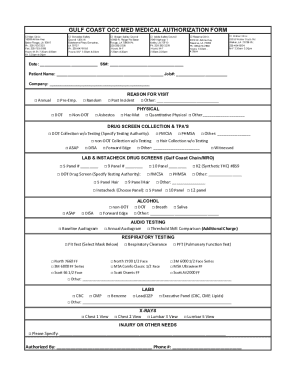
Get La Gulf Coast Occ Med Medical Authorization Form 2019-2026
How it works
-

Open form follow the instructions
-

Easily sign the form with your finger
-

Send filled & signed form or save
How to fill out the LA Gulf Coast OCC Med Medical Authorization Form online
This guide provides comprehensive instructions for filling out the LA Gulf Coast OCC Med Medical Authorization Form online. Following these steps will help ensure that you complete the form accurately and efficiently.
Follow the steps to complete the form online.
- Click ‘Get Form’ button to access the form and open it in the online editor.
- Begin by entering the date and your Social Security Number in the designated fields. This information is essential for identification purposes.
- Fill in your name and job number in the fields provided. If you work for a specific company, include the company's name as well.
- Indicate the purpose of your visit by checking the appropriate box such as Annual, Pre-Employment, DOT, Random, or Non-DOT, depending on your circumstance.
- Select the reason for your visit by checking the relevant boxes, which may include Post Incident or Asbestos.
- Complete the sections related to drug screening by checking the applicable options, which may include DOT Collection without Testing or using a specific testing authority.
- Indicate any required lab services or tests by selecting the appropriate options such as CBC, CMP, or X-Rays. Check all that apply based on your medical needs.
- In the case of respiratory testing, specify the type and select the appropriate mask if a fit test is required.
- Finish by signing the authorization area to give consent for the medical testing, and include a contact phone number.
- Once all sections are filled out, you can save changes, download the completed form, print it, or share it as needed.
Start filling out the LA Gulf Coast OCC Med Medical Authorization Form online today to ensure all necessary information is accurately recorded.