Loading
Get Nd Sfn 18385 2022-2026
How it works
-

Open form follow the instructions
-

Easily sign the form with your finger
-

Send filled & signed form or save
How to fill out the ND SFN 18385 online
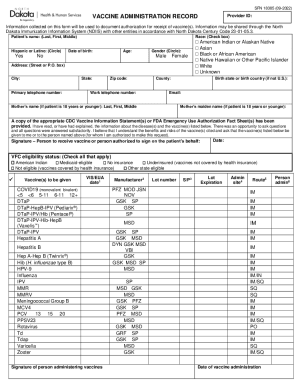
Filling out the ND SFN 18385 form online is a straightforward process that ensures accurate record-keeping for vaccine administration. This guide provides essential steps to help you complete the form with confidence.
Follow the steps to complete the ND SFN 18385 form accurately.
- Press the ‘Get Form’ button to access the form and open it in your preferred online document editor.
- Begin by entering the patient's name in the designated fields, including last name, first name, and middle name. Make sure to input these details accurately for proper record-keeping.
- Indicate whether the patient is Hispanic or Latino by circling 'Yes' or 'No'. This helps provide valuable demographic information.
- Select the patient's race by checking the appropriate box. Options include American Indian, Asian, Black or African American, Native Hawaiian or Other Pacific Islander, White, or Unknown.
- Enter the patient's date of birth and age. This is crucial for identifying vaccination eligibility and vaccination history.
- Circle the patient's gender as either Male or Female. This will assist in formulating health records.
- Provide the patient's address, including street or P.O. box, city, state, and zip code. Additionally, include the primary and work telephone numbers for contact purposes.
- Fill in the county and, if applicable, the birth state or birth country for patients born outside of the United States.
- Enter the patient's email address, ensuring it is one that you check frequently for follow-up information.
- If the patient is 18 years or younger, include the name and maiden name of the mother in the specified fields.
- Acknowledge receipt of the CDC Vaccine Information Statement(s) or FDA Emergency Use Authorization Fact Sheet(s). Confirm that you have read or had explained the vaccine information before making a vaccination request.
- The authorized person must provide their signature along with the date to validate the request for vaccination.
- Check the box that corresponds to the VFC eligibility status of the patient. This includes options like American Indian, Medicaid-eligible, and others.
- List the vaccines to be administered by checking the appropriate boxes next to each listed vaccine.
- For each administered vaccine, document the manufacturer, lot number, expiration date, administration site (such as left arm or right thigh), and the route of administration (like IM for intramuscular).
- Lastly, include the date of vaccine administration and the signature or initials of the person administering the vaccine.
- Once you have completed all sections of the form, you can save your changes, download the document, print it for your records, or share it as needed.
Begin filling out your ND SFN 18385 form online today for efficient vaccine record management.
If you need proof of immunization, the best place to start is by contacting the clinic, doctor, or healthcare provider that administered the vaccination. If your provider has the record on file, this will be the fastest way of obtaining your records.