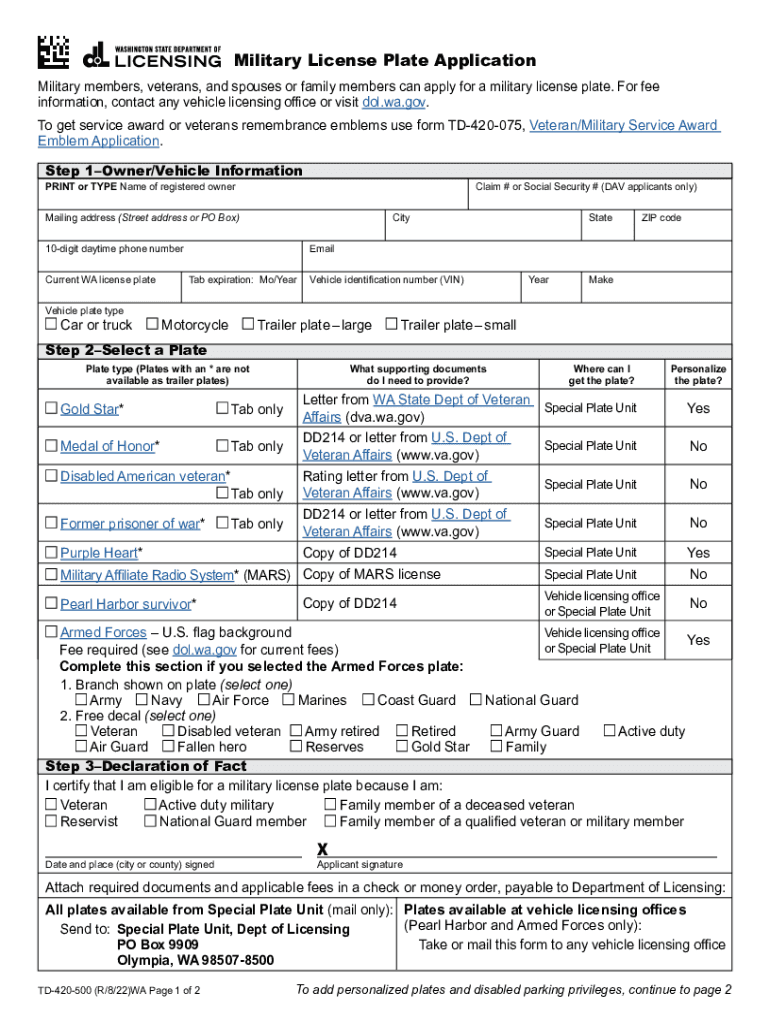
Dol.wa.gov. To get service award or veterans remembrance emblems use form TD-420-075, Veteran/Military Service Award Emblem Application. Step 1 Owner/Vehicle Information PRINT or TYPE Name of registered owner Claim # or Social Security # (DAV applicants only) Mailing address (Street address or PO Box) City 10-digit daytime phone number Current WA license plate Vehicle plate type Car or truck State ZIP code Email Tab expiration: Mo/Year Motorcycle Vehicle identification number (VIN.
Loading

Open form follow the instructions

Easily sign the form with your finger

Send filled & signed form or save
How to fill out the WA DoL TD-420-500 online
Completing the WA DoL TD-420-500 form for military license plates can seem daunting, but this guide provides clear instructions to help you through the process online. By following these steps, you will ensure that your application is filled out accurately and efficiently.
Follow the steps to successfully fill out your application.
- Click ‘Get Form’ button to access the application form and open it in your browser or preferred editor.
- Begin by providing owner and vehicle information. This includes the name of the registered owner, claim number or social security number (for DAV applicants), mailing address, city, daytime phone number, current WA license plate, vehicle type, state, ZIP code, email address, tab expiration, and vehicle identification number (VIN). Make sure to enter all details clearly and accurately.
- Select the type of plate you wish to apply for. Note any specific types that are not available for trailer plates, such as Gold Star or Medal of Honor. Additionally, be prepared with supporting documents, such as a letter from the Washington State Department of Veteran Affairs or a DD214 form.
- If you are personalizing your plate, indicate whether you want to personalize it by answering yes or no. If yes, list your preferred choices while ensuring that they abide by the restrictions outlined in the application.
- Complete the declaration of fact. Indicate your eligibility by selecting your status, such as veteran, active duty military, or family member of a deceased veteran. Ensure to sign and date the form.
- Prepare to submit your application by attaching the required documents and fees. Send the completed application to the appropriate addresses listed on the form, ensuring that you follow all instructions for submission accurately.
- Once submitted, you may be able to save changes to your application, download a copy for your records, print the filled form, or share it as needed.
Start your application process online today to secure your military license plate.
Experience a faster way to fill out and sign forms on the web. Access the most extensive library of templates available.
Related content
To get service award or veterans remembrance emblems use form TD-420-075, Veteran/Military...
Oct 4, 2017 — than 420 million consumer visits to our website, ... Before the breach...
As of this writing (March 1998), there are about 500 commissioned ASOS's nationwide. An...
Use professional pre-built templates to fill in and sign documents online faster. Get access to thousands of forms.
If you believe that this page should be taken down, please follow our DMCA take down process here.
This form is available in several versions. Select the version you need from the drop-down list below.