Loading
Get Ny Emedny-490602 2014-2026
How it works
-

Open form follow the instructions
-

Easily sign the form with your finger
-

Send filled & signed form or save
How to fill out the NY EMEDNY-490602 online
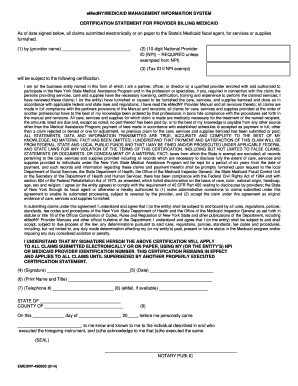
Filling out the NY EMEDNY-490602 form accurately is essential for providers billing Medicaid in New York. This guide will provide step-by-step instructions to ensure that you complete the form correctly and efficiently.
Follow the steps to fill out the form successfully.
- Click the ‘Get Form’ button to obtain the form and open it in the online editor.
- In Field 1, enter the name of the provider whose signature is required, ensuring it matches official records.
- For Field 2, input the 10-digit National Provider Identifier (NPI) unless you are exempted from providing it.
- If exempt from the NPI, enter the Tax ID in Field 3.
- In Field 4, include the signature of the individual listed in Field 1. This must be an original signature.
- Document the date you signed the Certification Statement in Field 5.
- In Field 6, print the name and title of the person whose signature appears in Field 4.
- For Field 7, enter the telephone number of the person who signed in Field 4.
- If available, provide the email address of the individual whose signature appears in Field 4 in Field 8.
- Field 9 must be completed by a Notary Public. Ensure the notary includes their signature, seal, and commission expiration date.
- Once all fields are completed, review the form for accuracy. You can then save your changes, download, print, or share the completed form as needed.
Complete the NY EMEDNY-490602 form online today to ensure timely processing of your Medicaid claims.
To reach the Medicaid New York EDI department, call 1-800-343-9000, which is part of the NY EMEDNY-490602 operations. This resource is vital for understanding electronic data interchange processes. Don't hesitate to contact them for support in managing your electronic billing needs.