Loading
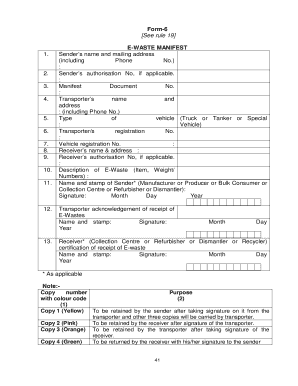
Get Form 6 E Waste
How it works
-

Open form follow the instructions
-

Easily sign the form with your finger
-

Send filled & signed form or save
How to fill out the Form 6 E Waste online
The Form 6 E Waste is a vital document used for the proper handling and disposal of electronic waste. This guide will provide you with clear, step-by-step instructions to help you complete the form efficiently and accurately online.
Follow the steps to complete the Form 6 E Waste online.
- Use the ‘Get Form’ button to access the Form 6 E Waste, ensuring you have it open in your digital editor.
- Start by entering the sender’s name and mailing address, including the phone number. Ensure that all required fields are filled accurately.
- If applicable, provide the sender's authorisation number in the designated field.
- Fill in the manifest document number. This is essential for tracking and recording purposes.
- Next, input the transporter’s name and address, also including their phone number.
- Specify the type of vehicle being used for transportation, selecting from options such as Truck, Tanker, or Special Vehicle.
- Enter the transporter’s registration number as well as the vehicle registration number.
- Detail the receiver’s name and address in the corresponding fields.
- If applicable, input the receiver's authorisation number as well.
- Provide a description of the e-waste, including item specifics and weight or quantity.
- Add the name and stamp of the sender, which could be the Manufacturer, Producer, Bulk Consumer, Collection Centre, Refurbisher, or Dismantler, along with their signature and the date.
- Include the transporter's acknowledgement of receipt of e-waste, complete with their name, stamp, signature, and date.
- Lastly, include the receiver’s certification of receipt of e-waste, including their name, stamp, signature, and the date. Ensure all details are verified and save any changes.
Complete your Form 6 E Waste online today to ensure responsible e-waste management.
How to Complete a Hazardous Waste Manifest Box 1: Generator ID Number. ... Box 2: Page 1 of. ... Box 3: Emergency Response Phone. ... Box 5: Generator's Name & Mailing Address. ... Box 6: Transporter 1 Company Name & U.S. EPA ID Number. ... Box 7: Transporter 2 Company Name. ... Box 8: Designated Facility Name & Address. ... Box 9a: HM.