Loading
Get Supplier Profile Template
How it works
-

Open form follow the instructions
-

Easily sign the form with your finger
-

Send filled & signed form or save
How to fill out the Supplier Profile Template online
The Supplier Profile Template is an essential tool for gathering crucial information about suppliers. This guide provides a step-by-step approach to help you complete the form accurately and efficiently.
Follow the steps to fill out the Supplier Profile Template with ease.
- Click ‘Get Form’ button to obtain the Supplier Profile Template and access it in the online editor.
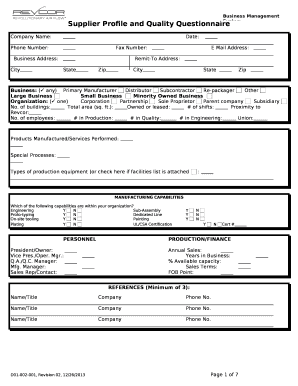
- Fill in the Company Name, Date, Phone Number, and Fax Number at the beginning of the form. Ensure that all entries are accurate to facilitate communication.
- Complete the Business Address section, including Street Address, City, State, and Zip code. Review your entries for correctness.
- Provide your E Mail Address and fill in the Remit-To Address, including City, State, and Zip. This information is vital for billing purposes.
- Select your Business type by checking the appropriate boxes such as Primary Manufacturer, Distributor, Subcontractor, and others.
- Indicate your Organization type by selecting one option from the list provided. Common options include Corporation, Partnership, and Sole Proprietor.
- Fill out the sections regarding your facilities, including the number of buildings, total area, owned or leased status, shifts, proximity to Revcor, and number of employees.
- Detail the Products Manufactured and Services Performed. Include any special processes and types of production equipment, checking if a facilities list is attached.
- For Manufacturing Capabilities, indicate Yes or No for each capability listed, such as Engineering, Sub-Assembly, or other pertinent options.
- In the Personnel section, provide names and titles for key positions, including President/Owner, Vice President/Operating Manager, and others.
- Complete the Annual Sales, Years in Business, and percentage of Available Capacity, followed by the Sales Terms and FOB Point.
- List at least three references in the References section, including names, titles, companies, and phone numbers.
- Carefully review all your entries for accuracy and completeness.
- Once satisfied, save your changes, and choose to download, print, or share the Supplier Profile Template for submission.
Complete the Supplier Profile Template online to ensure a smooth procurement process.
ITIL describes four categories of suppliers: Strategic Suppliers. These are suppliers that provide goods and services that are a key aspect of the purchasing organization's overall delivery of services. ... Tactical Suppliers. ... Operational Suppliers. ... Commodity Suppliers.