Loading
Get Bunnings Receipt Template
How it works
-

Open form follow the instructions
-

Easily sign the form with your finger
-

Send filled & signed form or save
How to fill out the Bunnings Receipt Template online
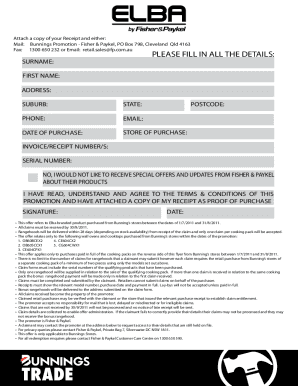
Filling out the Bunnings Receipt Template online is a straightforward process that enables you to claim promotional offers effectively. This guide will provide clear and detailed instructions to assist you through each section of the form, ensuring that you can complete it accurately and efficiently.
Follow the steps to complete the Bunnings Receipt Template online.
- Press the ‘Get Form’ button to acquire the form and open it in your preferred editing tool.
- Enter your surname in the designated field to identify yourself.
- Fill in your first name as it appears on official documents.
- Provide your current address in the corresponding field to ensure proper communication.
- Indicate your suburb to assist in locating your residence.
- Select your state from the options provided, ensuring correct regional information.
- Input your postcode to finalize your address details.
- Include your phone number for follow-up communication purposes.
- Provide your email address to receive updates or confirmations about your claim.
- Record the date of purchase in the specified field for accurate tracking of your transaction.
- Fill in the store of purchase to validate where the transaction took place.
- Enter the invoice or receipt number(s) as proof of your purchase.
- Include the serial number of the product you are claiming for, ensuring it's accurate.
- If you do not wish to receive special offers and updates from Fisher & Paykel, make your selection here.
- Acknowledge that you have read, understood, and agree to the terms and conditions of the promotion by marking the appropriate field.
- Affix your signature in the provided space to validate your submission.
- Fill in the date of your signature to confirm when you completed the form.
- Once all fields are complete, review your information for accuracy, then save changes, and download or print the completed form for submission.
Start filling out your documents online today to take advantage of the Bunnings promotion.
Please contact Customer Support at customersupport@bunnings.com.au or call 1800 797 586 for assistance.