Loading
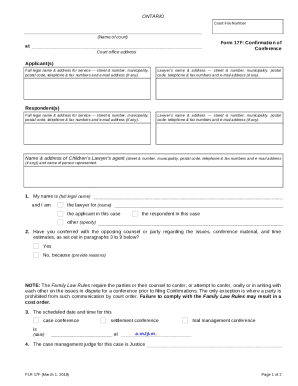
Get Canada Flr 17f 2018
How it works
-

Open form follow the instructions
-

Easily sign the form with your finger
-

Send filled & signed form or save
How to fill out the Canada FLR 17F online
This guide provides a comprehensive overview of how to fill out the Canada FLR 17F form online. Whether you are a lawyer or a person involved in legal proceedings, following these instructions will help ensure that the form is completed accurately and efficiently.
Follow the steps to complete the form correctly:
- Press the ‘Get Form’ button to access the Canada FLR 17F form and open it in your preferred editor.
- Begin by entering the court file number, which can be found on your court documents.
- Fill in the name of the court where your case is being heard.
- Provide your full legal name and address for service. This includes your street address, municipality, postal code, and contact information such as telephone, fax numbers, and email if applicable.
- If you are represented by a lawyer, include their full name and contact details in the designated section.
- Next, provide the same information for the respondent(s) as you did for yourself, including any lawyers they may have.
- Indicate your role in the case by selecting one of the provided options: lawyer for applicant, lawyer for respondent, or other.
- Answer the question regarding whether you have conferred with the opposing counsel or party about the issues, and provide reasons if you answered ‘No.’
- Fill in the scheduled date and time for the case conference, settlement conference, or trial management conference.
- Specify the name of the case management judge handling your case.
- Indicate the status of the matter, whether it is going ahead, being adjourned, or any other relevant status.
- List the key issues to be resolved at this step in the case by providing them in the corresponding section.
- Mention any additional pages or tabs that the presiding judge should refer to beyond the case conference brief.
- Estimate the time required for the conference for both the applicant and respondent.
- Before finalizing, ensure that you deliver a copy of this completed form to the opposing counsel or party as required.
- Finally, sign and date the form in the signature section before submitting it to the court.
Start filling out your documents online today!
Get form
Experience a faster way to fill out and sign forms on the web. Access the most extensive library of templates available.
Get This Form Now!
Use professional pre-built templates to fill in and sign documents online faster. Get access to thousands of forms.