Loading
Get Sz Ers Paye Monthly Declaration Form 2017
How it works
-

Open form follow the instructions
-

Easily sign the form with your finger
-

Send filled & signed form or save
How to fill out the SZ ERS Paye Monthly Declaration Form online
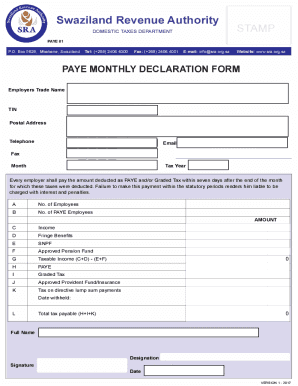
Filling out the SZ ERS Paye Monthly Declaration Form online is a crucial process for employers to ensure compliance with tax regulations. This guide provides clear and concise instructions on each section of the form, making it easier for users to accurately complete their declaration.
Follow the steps to successfully complete your online form.
- Click 'Get Form' button to access the form and open it in the online editor.
- Start by entering the employer's trade name in the designated field. This should reflect the official name under which you operate your business.
- Next, provide the Tax Identification Number (TIN) relevant to your business. This is necessary for identification and compliance purposes.
- Fill in the postal address of your business, ensuring that it is accurate for communication and documentation purposes.
- Enter the telephone number for your business in the appropriate field to facilitate any required communications.
- Provide an email address for receiving notifications or further information regarding the declaration.
- If applicable, include the fax number for any required document transmissions.
- Select the month and tax year for which you are filing the declaration in the respective dropdowns.
- Indicate the total number of employees in your organization within the designated field.
- Specify the number of PAYE employees, ensuring accuracy as this information is crucial for the calculation of the tax.
- Input the total income earned by your employees over the month in the income section.
- Include any fringe benefits provided to the employees in the corresponding section.
- Fill out the contributions to the Swaziland National Provident Fund (SNPF) if applicable.
- Provide information on any contributions to approved pension funds in the related field.
- Calculate the taxable income by subtracting the total of SNPF and pension contributions from the sum of income and fringe benefits.
- Determine the amount of PAYE tax based on the taxable income calculated previously.
- If applicable, input the graded tax amount in its designated section.
- Fill in any contributions to approved provident funds or insurance in the corresponding fields.
- Specify the tax on directive lump sum payments if this applies to your situation.
- Compute the total tax payable by adding the PAYE, graded tax, and tax on directive lump sum payments.
- Finally, ensure to enter your full name, designation, and sign the form with the date to authenticate the declaration.
- Once all fields are completed, save your changes, and download, print, or share the form as needed.
Complete your SZ ERS Paye Monthly Declaration Form online today to ensure compliance with tax obligations.
Get form
Experience a faster way to fill out and sign forms on the web. Access the most extensive library of templates available.
Swaziland Revenue Authority DOMESTIC TAXES DEPARTMENT P. O. Box 5628 MBABANE Tel 268 2404-1401/6295/7876 Fax 268 2404-2753 E-mail info sra.org. sz Website . sra.org.
Get This Form Now!
Use professional pre-built templates to fill in and sign documents online faster. Get access to thousands of forms.