N b) b) Was one of your parents born in Canada? Yes, go to page 2 No, continue to question c) c) When was your current certificate of Canadian citizenship issued? After January 1, 2007, submit the certificate with your application (original only). Before January 1, 2007, complete and submit form PPTC 001, Proof of Canadian Citizenship Additional Information, available online at Canada.ca/passport. PPTC 054 (10-2022) E (DISPONIBLE EN FRAN AIS - PPTC 055) Save 4 Reset Form Print Form.
Open form follow the instructions
Easily sign the form with your finger
Send filled & signed form or save
How to fill out the Canada PPTC 054 online
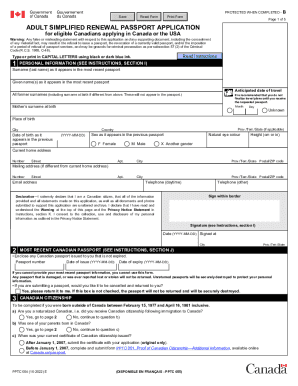
The Canada PPTC 054 form is designed for eligible Canadians applying for a simplified renewal passport. This guide provides step-by-step instructions to ensure that you complete the form accurately and efficiently, making the process of renewing your passport as smooth as possible.
Follow the steps to fill out your passport application form online.
- Press the ‘Get Form’ button to access the Canada PPTC 054 application form online. This will allow you to open the form in your editing environment.
- Begin with the personal information section. Enter your surname and given names as they appear on your most recent passport. Provide your anticipated date of travel, current home address, mailing address if different, and contact information. Ensure accuracy as these details will be used in your new passport.
- Fill in details regarding your most recent Canadian passport. Include the passport number, date of issue, and date of expiry. If you want your old passport returned, make sure to check the appropriate box.
- If applicable, complete the Canadian citizenship section. Indicate whether you are a naturalized Canadian and provide information about your parents' birthplace if you were born outside Canada in the specified timeframe.
- Specify the period of validity you require for your new passport—5 years or 10 years.
- Provide additional personal information regarding your addresses for the past two years and your occupation within the same timeframe. If you need more space, consider attaching form PPTC 056.
- List two references who are not related to you and who have known you for at least two years. Ensure that these individuals are aware their contact information may be shared.
- Complete the optional emergency contact information section if desired.
- Review all provided information for accuracy and completeness before signing. Your signature must match the one on your previous passport.
- Once all sections are complete, save any changes, and consider downloading or printing your application for your records.
Start your application for the Canada PPTC 054 online today!
Experience a faster way to fill out and sign forms on the web. Access the most extensive library of templates available.
Related content
Russell's only relationship to Royal Bank of Canada is the licensing of ... EZKI6DVB...
PPTC 054 (2015-05) R2 - Page 3 of 5 Complete Form E Applying in Person Canadians can...
Submit this form by mail AND a photocopy of a government-issued photo identification (such...
Get answers to your most pressing questions about US Legal Forms API.
What is the travel document Canada office number?
613-944-1310. 1-800-394-3472 (toll-free from Canada and the United States)
Can you print the passport application?
You can print it and fill it out by hand, or use the Passport Application Wizard to complete the form online and print it out to mail. You can also get a DS-82 form at a local passport acceptance facility or regional agency.
Do I need to print passport application form in color?
Please read all instructions first and type or print in black ink to complete this form. For information or questions, visit travel.state.gov or contact the National Passport Information Center (NPIC) at 1-877-487-2778 (TDD/TTY: 1-888-874-7793) or NPIC@state.gov.
Where to get passport application form Canada?
How to apply for a passport. Your clients can obtain an application form: At any At any Passport Program office, Canada Post outlet, Service Canada Centre or Government of Canada office abroad.
How to print passport application form Canada?
Both the form and the information entered can be printed by selecting the Print to PDF button found on the bottom of the last page of the form. To access this high-quality Portable Document Format (PDF) version you must have a PDF reader installed on your computer.
What is the meaning of simple renewal only?
(Simple Renewal means that no changes in the data from the current passport or the changes that is being made is already supported by documents issued by Philippine Statistics Authority (PSA))
How to fill passport application form?
Login to the Passport Seva Online Portal with the registered Login Id. Click "Apply for Fresh Passport/Re-issue of Passport" link. Fill in the required details in the form and submit. Click the "Pay and Schedule Appointment" link on the "View Saved/Submitted Applications" screen to schedule an appointment.
How should I print my passport application?
Reminders for Printing Your Application Make sure the image of the application covers the entire page. Use vertical, portrait format. ... Print your form single-sided on 8.5 inch by 11 inch letter-sized paper. ... The only handwritten marks we will accept when you use the Form Filler tool are your original signature and date.
Use professional pre-built templates to fill in and sign documents online faster. Get access to thousands of forms.
If you believe that this page should be taken down, please follow our DMCA take down process here.
This form is available in several versions. Select the version you need from the drop-down list below.