Loading
Get Canada Pptc 482 2022-2026
How it works
-

Open form follow the instructions
-

Easily sign the form with your finger
-

Send filled & signed form or save
How to fill out the Canada PPTC 482 online
Filling out the Canada PPTC 482 form is an essential step for Canadians applying for a passport while abroad. This guide will walk you through each component of the form, ensuring your application is completed accurately and efficiently.
Follow the steps to complete your passport renewal application.
- Press the ‘Get Form’ button to access the form and open it in the editing interface.
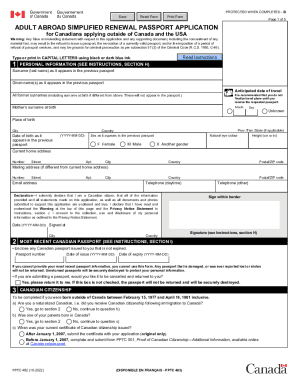
- Provide your personal information in section 1. Include your surname as it appears on your previous passport, your given names, and your anticipated date of travel. List all former surnames and your mother's surname at birth.
- Fill in your place of birth, date of birth, sex, natural eye color, and height. Ensure your current home and mailing address are correctly entered.
- Complete the declaration section, affirming your citizenship status and accuracy of the information provided, and sign the application where indicated.
- In section 2, enclose your most recent Canadian passport, providing its passport number, date of issue, and date of expiry. Indicate whether you would like the passport returned.
- If applicable, complete the Canadian citizenship section by answering questions related to your citizenship status and submit any required documents.
- Select the appropriate period of validity for your passport, either 5-year or 10-year.
- Fill in previous addresses within the last two years in section 5, as well as your occupation history.
- Provide information for two referees who are not relatives, and have known you for at least two years.
- Optionally, fill out the emergency contact information for assistance while abroad.
- Review all sections, ensuring all details are filled out correctly. Save your changes and prepare to submit your application.
- Finally, you can save the form, download it for your records, or print it out for submission.
Start filling out your Canada PPTC 482 form online today to ensure a smooth passport renewal process.