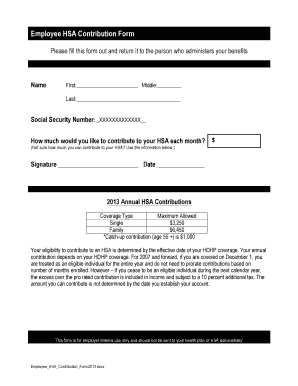
Social Security Number: XXXXXXXXXXXXX How much would you like to contribute to your HSA each month? $ (Not sure how much you can contribute to your HSA? Use the information below.) Signature Date 2013 Annual HSA Contributions Coverage Type Maximum Allowed Single $3,250 Family $6,450 *Catch-up contribution (age 55 +) is $1,000 Your eligibility to contribute to an HSA is determined by the effective date of your HDHP coverage.

How it works
  • Open form

    Open form follow the instructions

  • Easily sign form

    Easily sign the form with your finger

  • Share form

    Send filled & signed form or save

How to fill out the UT HealthEquity Employee HSA Contribution Form online

Completing the UT HealthEquity Employee HSA Contribution Form online is a straightforward process that allows you to manage your Health Savings Account (HSA) contributions conveniently. This guide provides step-by-step instructions to ensure you fill out the form accurately and efficiently.

Follow the steps to complete the form successfully.

  1. Click the ‘Get Form’ button to access the form and open it for editing.
  2. Begin by entering your name in the designated fields. Provide your first name, middle name, and last name as requested.
  3. In the section for Social Security Number, input your number in the format indicated, ensuring the required digits are filled accurately.
  4. Next, specify the monthly contribution amount you wish to make to your HSA. Ensure the amount entered aligns with your budget and the contribution limits provided.
  5. Review the maximum allowed annual contributions based on your coverage type—either Single or Family—and ensure your monthly contribution does not exceed these limits.
  6. If you are age 55 or older, consider whether you want to include the catch-up contribution in your monthly amount.
  7. Sign the form in the designated space to confirm your contributions, followed by entering today's date.
  8. Once you have filled out all necessary fields, you can save changes, download the form, print it, or share it as needed.

Take control of your health savings today by completing your documents online.

Get form

Experience a faster way to fill out and sign forms on the web. Access the most extensive library of templates available.

Questions & Answers

Get answers to your most pressing questions about US Legal Forms API.

Contact support

How do I remove excess contributions from HSA HealthEquity?

Process to correct excess contributions Yes: Contributions may need to be removed by your employer by having them complete the 'HSA Employer Contribution Correction Request form. ' If they are unwilling to complete this form, please fill out the 'Distribution of Excess HSA Contribution Form.

While employer contributions to an HSA may be excluded from the employee's income, all employer contributions, including those made by the employee through a cafeteria plan, must be reported in box 12 of the employee's W-2.

Go to the 'HSA' menu located under the 'My Account' tab, 'HSA' and select 'Make Contribution.' You can make a one-time contribution or set up recurring monthly contributions. If an EFT account has not been added and verified, select 'Add account.'

Go to the 'HSA' menu located under the 'My Account' tab, 'HSA' and select 'Make Contribution.' You can make a one-time contribution or set up recurring monthly contributions. If an EFT account has not been added and verified, select 'Add account.'

To edit or cancel your recurring contributions: In the 'My Account' tab of the HealthEquity member portal, select 'Make Contribution' from the 'HSA' menu. From this page you can make changes to recurring contributions or cancel the contribution by clicking 'Stop/End.

You can change the amount you contribute to your HSA at any time during the plan year. If you are changing the amount contributed via payroll on a pre-tax basis, check with your employer. You can also make non-payroll contributions changes using the Contribution Center in your online account.

File Form 8889 to: Report health savings account (HSA) contributions (including those made on your behalf and employer contributions). Figure your HSA deduction. Report distributions from HSAs.

Generally, the IRS penalty equals 6 percent of your excess contributions. For example, if you have a $100 excess contribution, your fine would be $6.00. If you contributed $1,000 over, it would be $60. This penalty is called an “excise tax,” and applies to each tax year the excess contribution remains in your account.

Get This Form Now!

Use professional pre-built templates to fill in and sign documents online faster. Get access to thousands of forms.

If you believe that this page should be taken down, please follow our DMCA take down process here.

Get UT HealthEquity Employee HSA Contribution Form