Loading
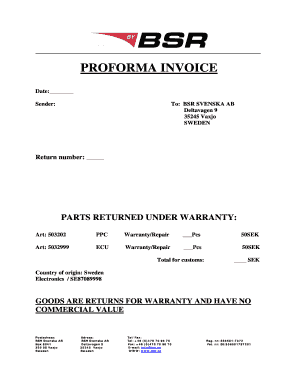
Get Proforma Invoice - Bbsrb - Bsr
How it works
-

Open form follow the instructions
-

Easily sign the form with your finger
-

Send filled & signed form or save
How to fill out the PROFORMA INVOICE - BBSRb - Bsr online
Filling out the PROFORMA INVOICE - BBSRb - Bsr online can streamline your document management process. This guide provides clear, step-by-step instructions to help you complete the form accurately and efficiently.
Follow the steps to successfully complete the PROFORMA INVOICE online.
- Press the ‘Get Form’ button to access the PROFORMA INVOICE document and open it in your editing interface.
- Enter the date at the top of the form, indicating when the invoice is generated.
- Fill in the sender's information, ensuring to include relevant details such as your complete name, address, and contact information.
- Under the recipient section, clearly input the name, address, and contact details for BSR SVENSKA AB, as specified in the form.
- Input the return number in the designated field, if applicable.
- For the parts returned under warranty, list the article numbers, descriptions, and the number of pieces being returned in the corresponding fields. Ensure accuracy in this section.
- Specify the unit cost for each item in the invoice, following the currency stated (SEK).
- Calculate and enter the total for customs in the provided field, making sure it reflects the correct amount for the items listed.
- Indicate the country of origin as Sweden, along with the relevant code for the goods being returned.
- Confirm the statement regarding the goods having no commercial value by ensuring it is clearly marked.
- Include your complete mailing address and contact information in the appropriate fields at the bottom of the form.
- Once all fields have been completed, review the form for accuracy, then save your changes, and proceed to download, print, or share the completed document as needed.
Complete your PROFORMA INVOICE online today to ensure efficient processing of your returns.
Proforma invoices are not legally binding and are not counted as official sales in your accounting department. Traditional invoices confirm a purchase or sale, whereas proforma invoices are just a way to establish the terms of the sale.
Industry-leading security and compliance
US Legal Forms protects your data by complying with industry-specific security standards.
-
In businnes since 199725+ years providing professional legal documents.
-
Accredited businessGuarantees that a business meets BBB accreditation standards in the US and Canada.
-
Secured by BraintreeValidated Level 1 PCI DSS compliant payment gateway that accepts most major credit and debit card brands from across the globe.