Loading
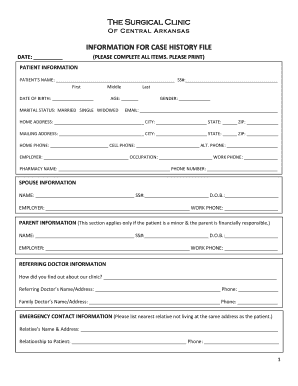
Get Ar Surgical Clinic Information For Case History File 2012-2025
How it works
-

Open form follow the instructions
-

Easily sign the form with your finger
-

Send filled & signed form or save
How to fill out the AR Surgical Clinic Information For Case History File online
Filling out the AR Surgical Clinic Information For Case History File online is a vital step in the patient registration process. This guide will walk you through each section of the form, ensuring you provide all necessary information accurately and efficiently.
Follow the steps to complete your case history file.
- Click ‘Get Form’ button to begin the process of obtaining the form and access it in the editor.
- Complete the patient information section, including the patient's name, date of birth, marital status, and contact details. Ensure all items are filled out clearly.
- If applicable, provide spouse information in the specific section designated for this purpose, including name, social security number, and date of birth.
- Fill out the parent information section if the patient is a minor and the parent is financially responsible, including the parent's name and employer details.
- In the referring doctor information section, provide how you heard about the clinic, along with the names and contact details of any referring or family doctors.
- Include emergency contact information, noting the nearest relative not living with the patient, and their relationship to the patient.
- Authorize payment directly to the clinic and release information to the insurance company by signing and dating the authorization section.
- State the reason for your appointment and document key health metrics such as height and weight.
- List any previous surgeries, including the procedure, date, hospital, surgeon, and any complications experienced.
- Provide details regarding allergies and past medical history, marking any relevant symptoms or conditions.
- Complete the social history section, noting marital status, dietary preferences, and substance use.
- Indicate family medical history by checking relevant diseases present in the family.
- Fill out the review of systems section, marking any symptoms experienced in the past year.
- Complete the medications section by listing all prescription and over-the-counter medications, including dosages and purposes.
- Once all fields are completed to your satisfaction, you can save changes, download, print, or share the form as needed.
Start filling out your case history file online today to ensure a smooth process for your upcoming appointment.
If you have any questions or are unable to find what you're seeking, please call 1.866. CALL. MLH (225.5654), Monday through Friday between 8:00 am and 6:00 pm ET, to speak with us or visit the contact us page to find information for a specific Main Line Health hospital.
Industry-leading security and compliance
US Legal Forms protects your data by complying with industry-specific security standards.
-
In businnes since 199725+ years providing professional legal documents.
-
Accredited businessGuarantees that a business meets BBB accreditation standards in the US and Canada.
-
Secured by BraintreeValidated Level 1 PCI DSS compliant payment gateway that accepts most major credit and debit card brands from across the globe.