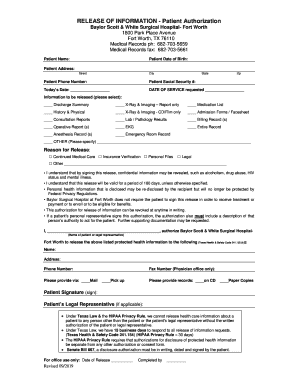
03-5661 Patient Name: Patient Date of Birth: Patient Address: Street City State Zip Patient Phone Number: Patient Social Security #: Today s Date: DATE OF SERVICE requested Information to be released (please select): Discharge Summary X-Ray & Imaging Report only Medication List History & Physical X-Ray & Imaging - CD/Film only Admission Forms / Facesheet Consultation Reports Lab / Pathology Resul.

How it works
  • Open form

    Open form follow the instructions

  • Easily sign form

    Easily sign the form with your finger

  • Share form

    Send filled & signed form or save

How to fill out the Baylor Scott And White Medical Records online

This guide provides comprehensive instructions on completing the Baylor Scott And White Medical Records form online. By following these steps, users can easily navigate the required fields and submit their medical records requests efficiently.

Follow the steps to complete your medical records request.

  1. Press the 'Get Form' button to obtain the Baylor Scott And White Medical Records form and open it in your preferred editor.
  2. Begin by filling in your personal details in the designated fields. Enter your full name, date of birth, address including street, city, state, and zip code, phone number, and social security number.
  3. Indicate today's date clearly in the provided space so that the authorization is current.
  4. Specify the date of service for which you are requesting information in the appropriate field.
  5. Select the types of information you wish to be released by checking the relevant boxes. Options include discharge summaries, lab results, consultation reports, and others as listed. If selecting 'OTHER,' be sure to specify the information needed.
  6. Choose the reason for the release of information by marking one of the options. This section includes choices like continued medical care, insurance verification, or personal files.
  7. Review the agreement regarding potential disclosure of confidential information and acknowledge it by signing in the appropriate section.
  8. Authorize the release of information by entering your name (or the name of your legal representative if applicable) in the designated area, and provide the name, address, and phone number of the person to whom the information should be sent.
  9. Select the preferred method for receiving the records, whether by mail, pick up, or fax, including any necessary fax numbers for physician offices.
  10. Indicate whether you wish to receive the records on a CD or in paper copies.
  11. Finally, sign the form in the designated area to authorize the request. If applicable, ensure that your legal representative also signs the form.
  12. Once completed, save your changes, and download or print the form for submission as needed. Ensure you keep a copy for your records.

Complete your medical records request online today for a seamless experience.

Get form

Experience a faster way to fill out and sign forms on the web. Access the most extensive library of templates available.

Related content

Baylor Scott & White The Heart Hospital – Denton

The app lets you book appointments, message your pediatrician, view your child's medical...

Learn more
Medical Records Release Form

PLEASE NOTE: For PHI requested from Baylor University Health Services, the Medical Records...

Learn more
UNITED STATES OF AMERICA

Feb 26, 2020 — Texas Children's Hospital and Baylor College of Medicine ... imaging...

Learn more
Questions & Answers

Get answers to your most pressing questions about US Legal Forms API.

Contact support

How do I get my medical records from Baylor?

To request copies of your medical records, please download, complete and sign the Authorization for Release of Information form for your Baylor Scott & White Health facility. Completed forms may be mailed or faxed to the facility's health information management department.

Baylor Scott & White's MyBSWHealth app gives you the ability to manage all of your healthcare needs in one place. Within the app, you can: • Find doctors and locations in your network and schedule appointments with ease. • Securely communicate with your care team. • View lab results and past visit summaries.

Current users can download the free MyBSWHealth app, available on Apple™ iOS and Android™ devices, to view test results, immunizations, medications, appointments and more.

Yes, if you have not created a MyChart account with Baylor Scott & White Health you will need to create a MyBSWHealth account. MyChart account credentials used from a health care provider other than Baylor Scott & White Health will not work.

To verify whether your insurance plan covers services rendered at Baylor Scott & White Health, contact your insurance provider directly by visiting your provider's website or calling the phone number listed on your insurance identification card.

The Department of State Health Services is committed to providing full access to public information. To request records under the Texas Public Information Act: Submit a request in writing via U.S. Mail, fax or email. Include contact information and a clear description of the records you are requesting.

General Information. Completed forms for Baylor students and employees can be faxed to 713-798-3364 or emailed to ohp@bcm.edu. (Do not send the forms here if you are requesting records on a patient of BCM.

With EpicCare Link, referring practitioners and staff can: Have secure access to their patients' medical records. Receive results and notifications, and securely send HIPAA-compliant messages to Baylor Scott & White practitioners. Make referrals and upload documents to a patient's Epic chart.

Get This Form Now!

Use professional pre-built templates to fill in and sign documents online faster. Get access to thousands of forms.

If you believe that this page should be taken down, please follow our DMCA take down process here.

Get Baylor Scott And White Medical Records