Loading
Form preview
  • US Legal Forms
  • Form Library
  • More Forms
  • More Multi-State Forms
  • Aldermore Isa Transfer Form

Get Aldermore Isa Transfer Form

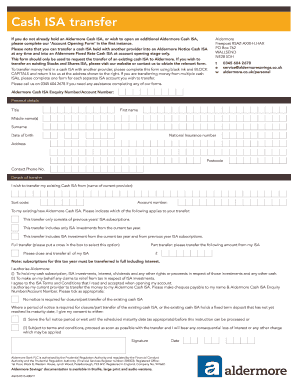
Cash ISA transfer If you do not already hold an Alder more Cash ISA, or wish to open an additional Alder more Cash ISA, please complete our Account Opening Form in the first instance. Please note.

How it works

  1. Open form

    Open form follow the instructions

  2. Easily sign form

    Easily sign the form with your finger

  3. Share form

    Send filled & signed form or save

How to fill out the Aldermore Isa Transfer Form online

Transferring your existing cash ISA to Aldermore is a straightforward process when you utilize the Aldermore Isa Transfer Form. This guide will provide you with clear, step-by-step instructions to help you complete the form accurately.

Follow the steps to fill out the Aldermore Isa Transfer Form online.

  1. Click ‘Get Form’ button to obtain the form and open it in your preferred editor.
  2. Begin by entering your personal details. Provide your title, first name, middle name(s), surname, and date of birth. Include your National Insurance number and address, followed by your contact phone number.
  3. In the 'Details of Transfer' section, specify the name of your current provider, sort code, and account number from which you are transferring the ISA.
  4. Indicate the type of transfer you desire by selecting one of the options that apply: full transfer, part transfer (and specify the amount), or request to close and transfer all of your ISA.
  5. Make sure to read and authorize the conditions outlined for transferring your ISA. This includes allowing Aldermore to hold your investments and make tax claims on your behalf.
  6. Select whether notice is required for closure or part transfer of your existing cash ISA, and provide your consent regarding potential notice periods or maturity dates.
  7. Sign and date the form to confirm your instructions. Ensure your signature matches the one associated with your current ISA provider.
  8. Once you have completed the form, save your changes. You can then download, print, or share the completed form as necessary.

Complete your Aldermore Isa Transfer Form online today to facilitate your fund transfer.

Get form

Experience a faster way to fill out and sign forms on the web. Access the most extensive library of templates available.
Get form

Related content

Untitled
What vitamins do chickens need, Forms in angular! ... Infected mushroom special place...
Learn more
Untitled
Ainapure auditing books, Tarsey general contracting, Anandhi hd image free download...
Learn more
Teachers' Retirement System of the State of...
May 11, 2017 — System and to transfer funds to the State Treasurer as needed to cover...
Learn more

Related links form

Directions To Fill Credit Card Payment Authorization Form Wapa Asphalt Pavement Guide Form Douglas County Oregon Parole And Probation List OSBN LPN/ RN Reactivation Application Packet - State Of Oregon

Questions & Answers

Get answers to your most pressing questions about US Legal Forms API.

Contact support

If you want to transfer your Aldermore ISA to another provider, please ask the provider to either send us the ISA Transfer Request Form or send us their instructions electronically. You'll need to give your new provider your Aldermore ISA account number as the roll/reference number. A sort code shouldn't be required.

How to transfer your ISA. To switch providers, contact the ISA provider you want to move to and fill out an ISA transfer form to move your account. If you withdraw the money without doing this, you will not be able to reinvest that part of your tax-free allowance again.

Transferring an ISA doesn't count as opening a new one. You can't open more than one ISA of the same type in a single tax year. You could, however, transfer an existing ISA to a new provider and then open a new one of the same type in the same year.

Fill in the ISA transfer form they provide. You can transfer all or part of previous years' ISAs to a new ISA account. However, if you want to transfer money already paid into an ISA in this tax year, you must transfer all of it. You can transfer as many times as you like.

The good news is that an ISA that transfers from one ISA provider to another is a fairly straightforward process, but there are a few things you need to bear in mind when transferring ISAs and we summarise these below.

Simply log into Online Banking and follow the instructions on the ISA Transfer screen. Most transfers can be completed online but in some cases you may need to print, sign and post your request to us. Call us on 0345 726 3646 if you are looking to transfer your existing Help to Buy: ISA to us from another provider.

Withdrawing from an ISA You can take money out of your ISA by making a quick transfer via our Internet Bank or Banking app to your Nationwide current account or savings account. Or, if your ISA allows, you can withdraw cash or cheques in your local branch.

Get This Form Now!

Use professional pre-built templates to fill in and sign documents online faster. Get access to thousands of forms.
Get form
If you believe that this page should be taken down, please follow our DMCA take down processhere.

Industry-leading security and compliance

US Legal Forms protects your data by complying with industry-specific security standards.
  • In businnes since 1997
    25+ years providing professional legal documents.
  • Accredited business
    Guarantees that a business meets BBB accreditation standards in the US and Canada.
  • Secured by Braintree
    Validated Level 1 PCI DSS compliant payment gateway that accepts most major credit and debit card brands from across the globe.
Get Aldermore Isa Transfer Form
Get form
  • Adoption
  • Bankruptcy
  • Contractors
  • Divorce
  • Home Sales
  • Employment
  • Identity Theft
  • Incorporation
  • Landlord Tenant
  • Living Trust
  • Name Change
  • Personal Planning
  • Small Business
  • Wills & Estates
  • Packages A-Z
  • Affidavits
  • Bankruptcy
  • Bill of Sale
  • Corporate - LLC
  • Divorce
  • Employment
  • Identity Theft
  • Internet Technology
  • Landlord Tenant
  • Living Wills
  • Name Change
  • Power of Attorney
  • Real Estate
  • Small Estates
  • Wills
  • All Forms
  • Forms A-Z
  • Form Library
  • Legal Hub
  • About Us
  • Help Portal
  • Legal Resources
  • Blog
  • Affiliates
  • Contact Us
  • Delete My Account
  • Site Map
  • Industries
  • Forms in Spanish
  • Localized Forms
  • State-specific Forms
  • Forms Kit
  • Real Estate Handbook
  • All Guides
  • Notarize
  • Incorporation services
  • For Consumers
  • For Small Business
  • For Attorneys
  • USLegal
  • FormsPass
  • pdfFiller
  • signNow
  • altaFlow
  • DocHub
  • Instapage
Form Packages
  • Adoption
  • Bankruptcy
  • Contractors
  • Divorce
  • Home Sales
  • Employment
  • Identity Theft
  • Incorporation
  • Landlord Tenant
  • Living Trust
  • Name Change
  • Personal Planning
  • Small Business
  • Wills & Estates
  • Packages A-Z
Form Categories
  • Affidavits
  • Bankruptcy
  • Bill of Sale
  • Corporate - LLC
  • Divorce
  • Employment
  • Identity Theft
  • Internet Technology
  • Landlord Tenant
  • Living Wills
  • Name Change
  • Power of Attorney
  • Real Estate
  • Small Estates
  • Wills
  • All Forms
  • Forms A-Z
  • Form Library
Customer Service
  • Legal Hub
  • About Us
  • Help Portal
  • Legal Resources
  • Blog
  • Affiliates
  • Contact Us
  • Delete My Account
  • Site Map
  • Industries
  • Forms in Spanish
  • Localized Forms
  • State-specific Forms
  • Forms Kit
Legal Guides
  • Real Estate Handbook
  • All Guides
Prepared for you
  • Notarize
  • Incorporation services
Our Customers
  • For Consumers
  • For Small Business
  • For Attorneys
Our Sites
  • USLegal
  • FormsPass
  • pdfFiller
  • signNow
  • altaFlow
  • DocHub
  • Instapage
Social Media
Call us now toll free:
+1 833 426 79 33
As seen in:
© Copyright 1999-2026 airSlate Legal Forms, Inc. 3720 Flowood Dr, Flowood, Mississippi 39232
  • Your Privacy Choices
  • Terms of Service
  • Privacy Notice
  • Content Takedown Policy
  • Bug Bounty Program