Loading
Get 14-day Refund Policy
How it works
-

Open form follow the instructions
-

Easily sign the form with your finger
-

Send filled & signed form or save
How to fill out the 14-Day Refund Policy online
This guide provides clear and detailed instructions for users looking to fill out the 14-Day Refund Policy form online. Whether returning an item or requesting an exchange, this comprehensive guide will assist you through each step of the process.
Follow the steps to complete the refund form accurately.
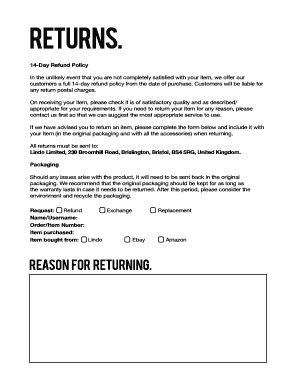
- Click the ‘Get Form’ button to access the refund policy form and open it in your preferred document editor.
- In the section labeled 'Request', select the reason for your return by choosing one of the options: Refund, Exchange, or Replacement.
- Provide your Name/Username in the designated field to identify your order.
- Enter your Order/Item Number in the appropriate box to assist in locating your purchase.
- Fill in the 'Item purchased' section to specify the product you are returning.
- Indicate where the item was bought from by selecting either 'Lindo', 'Ebay', or 'Amazon'.
- In the 'Reason for returning' field, provide a brief explanation for returning the product, which can help with the processing of your request.
- After completing all the fields accurately, review your information for any errors.
- Finally, save the changes, and download or print the form to include with your return package.
Begin filing your refund request online today to ensure a smooth and efficient process.
You must take reasonable care of the goods and not use them. You should return goods to us in their original packaging, wherever possible, within 14 days of informing us of your wish to cancel.