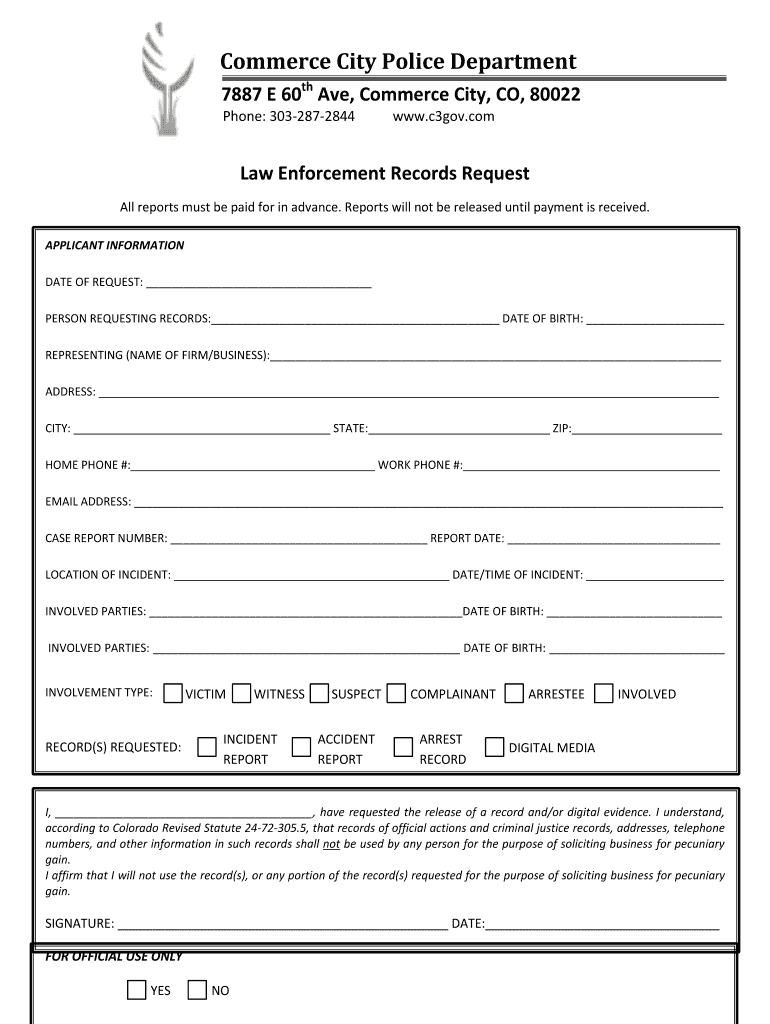
Ot be released until payment is received. APPLICANT INFORMATION DATE OF REQUEST: PERSON REQUESTING RECORDS: DATE OF BIRTH: REPRESENTING (NAME OF FIRM/BUSINESS): ADDRESS: CITY: STAT.
Loading

Open form follow the instructions

Easily sign the form with your finger

Send filled & signed form or save
How to fill out the Commerce City Police Department online form
This guide provides step-by-step instructions for completing the online form for the Commerce City Police Department. Following these instructions will help ensure that your request for police records is processed efficiently.
Follow the steps to complete your request for records.
- Click ‘Get Form’ button to obtain the form and open it for editing.
- Fill in the date of your request at the designated field labeled 'Date of request.' Make sure to use the current date to avoid processing delays.
- Provide your full name in the 'Person requesting records' field. This should be the name of the individual making the request.
- Enter your date of birth in the space provided. This information is required for identification purposes.
- If you are representing a firm or business, include the name of your organization in the 'Representing' field.
- Fill in your complete address, including street, city, state, and ZIP code. Ensure all information is accurate to prevent delivery issues.
- You will need to provide both your home and work phone numbers. If applicable, fill in your email address for quicker communication regarding your request.
- In the 'Case report number' field, enter the number associated with the incident you are inquiring about, if known. If you do not have this information, leave it blank.
- Complete the section for the location and date/time of the incident. This information is essential for the processing of your request.
- Provide details about the involved parties, including names and dates of birth as requested. Ensure this information is accurate.
- Select the appropriate involvement type from the options available. Choose from victim, witness, suspect, complainant, arrestee, or involved.
- Specify the records you are requesting by checking the relevant boxes for incident report, accident report, arrest record, or digital media.
- Read and sign the affirmation statement regarding the intended use of the records. Your signature and date are mandatory.
- Once completed, save the form to ensure your inputs are not lost. You may also download, print, or share the filled form as needed.
Complete your records request online today to facilitate timely processing.
Experience a faster way to fill out and sign forms on the web. Access the most extensive library of templates available.
Related content
Police. The Commerce Police Department is committed to providing unsurpassed law...
Apr 15, 2014 — Program Name, Commerce City Police Department CIT ; County, Adams ; City...
These guidelines are provided for use by government and law enforcement agencies within...
Get answers to your most pressing questions about US Legal Forms API.
How do I write my digital signature?
How to do it Write your name on a piece of white paper using a ballpoint pen. ... Using your smartphone, tablet, or home scanner, take a photo or scan the image of your signature. Use digital tools like your smartphone editor or an online photo editor to neatly crop your handwritten signature to an acceptable size.
Do you put signature in curriculum vitae?
Date, place, and signature Your signature should be handwritten, and can be scanned or photographed if you're sending your documents electronically. A CV will be just as valid without the signature, but it does award it a personal note.
How do I add a signature to my Europass CV?
Go to Sign -Sgt; Add New Signature and select the option you prefer: type, draw, or upload an image of your handwritten signature and place it where you need it. Finish filling out the form with the Done button. Download your copy, save it to the cloud, print it, or share it right from the editor.
How do I add a digital signature to my CV?
0:00 1:35 How to add Digital Signature to your CV - YouTube YouTube Start of suggested clip End of suggested clip And then you have to click on the enable editing. And click yes okay simply follow the steps. OkayMoreAnd then you have to click on the enable editing. And click yes okay simply follow the steps. Okay go to protect and click here pdf sign and go to pdf sign and here you can go to create signature.
How do I add a digital signature to my resume?
Here's how to do it: Create your eSignature with SignHouse (takes 10 seconds and it's free); Upload the PDF of your CV; Drag & Drop your signature anywhere you want it on the CV.
How do I add my electronic signature?
Click “Signature” on the left side of the page, click the spot where you want to insert your signature, and click the yellow “Adopt and Sign” button at the bottom of the window. Your signature will appear in the desired place on the document. Click “Finish” at the top of the page.
Where do we put signature on a resume?
The declaration must be placed at the bottom of the resume and it should be only 1-2 sentences. The place and date comes on the left side under the statement of declaration in resume. Put your signature at the right side of the statement of the declaration.
Can we add signature in CV?
The last page of the CV is hand-signed. The signature can be on the right, level with the place and date title found on the left. In the second option, the signature is second to last above the place and date.
Use professional pre-built templates to fill in and sign documents online faster. Get access to thousands of forms.
If you believe that this page should be taken down, please follow our DMCA take down process here.