Loading
Get Canada The Good Samaritan Society Form 503 2017-2026
How it works
-

Open form follow the instructions
-

Easily sign the form with your finger
-

Send filled & signed form or save
How to fill out the Canada The Good Samaritan Society Form 503 online
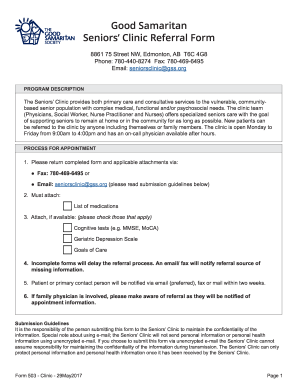
Filling out the Canada The Good Samaritan Society Form 503 online is an essential step in accessing the Seniors’ Clinic services. This guide provides clear, step-by-step instructions to help you complete the form accurately and efficiently, ensuring all necessary information is included.
Follow the steps to fill out the form online effectively.
- Press the ‘Get Form’ button to access the form and open it in your online editor or viewer.
- Begin with section A, where you will provide the patient or applicant information, including last name, first name, date of birth, and Alberta Personal Health Number.
- Continue by filling in the address details, including unit/suite, street, city/town, and postal code. Provide the patient's phone number and email.
- In the living arrangements/language section, specify if the patient lives in a house, apartment/lodge, or facility. Include any additional details such as lock box code or preferred language.
- Next, indicate the patient’s living situation with options like spouse, alone, or children. If the patient cannot leave home, provide an explanation.
- In section B, choose the type of referral request: Primary Care, Consultative Care, or Telephone Consult, and provide information regarding availability for short notice.
- Identify the referral source, indicating whether the referral comes from the patient, family member, family physician, or other healthcare providers.
- Move to section C and respond to mandatory patient information questions regarding memory loss, recent hospital visits, and need for home assistance.
- Complete the medical history section (D) by checking any current medical conditions that apply to the patient.
- Lastly, in section E, elaborate on the reasons for the referral, providing as much detail as possible about the patient’s specific health concerns.
- Once all sections are completed, review the form for accuracy, and ensure all required attachments (like medication lists) are included.
- Finally, submit the completed form via the specified methods, ensuring confidentiality is maintained during submission.
Start filling out the Canada The Good Samaritan Society Form 503 online today to access the necessary health services.
Related links form
Can you type your name as a signature? Does a signature have to be your full name? Yes, you can type your name as a signature if you use the right tools to capture information about when and where you signed. Some e-signing platforms invite signees to type their name as their electronic signature.