Loading
Get Irs Notice Cp59 2017-2026
How it works
-

Open form follow the instructions
-

Easily sign the form with your finger
-

Send filled & signed form or save
How to fill out the IRS Notice CP59 online
Filling out the IRS Notice CP59 is an important step for users who have received this notification regarding their tax return. This guide provides clear, step-by-step instructions to assist users in completing the form accurately and efficiently.
Follow the steps to properly complete the IRS Notice CP59.
- Click ‘Get Form’ button to obtain the form and open it in the editor.
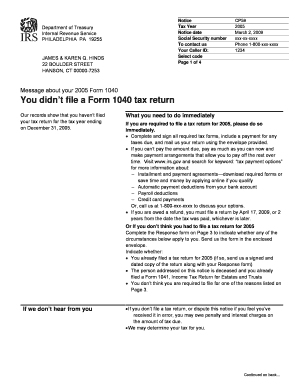
- Review your personal information on the notice, including your name, address, and Social Security number. Ensure all details are correct.
- Identify the tax year in question, which is highlighted in the notice. For the CP59, this typically refers to the year 2005.
- Read the message regarding your Form 1040 tax return. Take note of the instructions provided for either filing or disputing the notice.
- If you did not file a tax return and are required to do so, complete all necessary tax forms. Be sure to provide payment information for any taxes due.
- If you believe you do not need to file a tax return, complete the response form on page 3. Indicate any applicable circumstances and provide additional details as necessary.
- Sign the response form under penalties of perjury, confirming the accuracy of the information provided.
- Mail the completed form in the enclosed envelope, ensuring your address is visible through the window on the envelope.
- Keep a copy of the completed notice and any correspondences for your personal records.
Start filling out your IRS Notice CP59 online today to ensure compliance and avoid potential penalties.
There are many reasons why the IRS may change your expected refund amount, including: You may have listed an incorrect Social Security Number for yourself, your spouse, or child; or. The IRS may not agree with the amounts of Economic Impact Payments or Advance Child Tax Credit entered on your tax return.