Loading
Get Canada Form 61b - Ontario 2005-2026
How it works
-

Open form follow the instructions
-

Easily sign the form with your finger
-

Send filled & signed form or save
How to fill out the Canada Form 61B - Ontario online
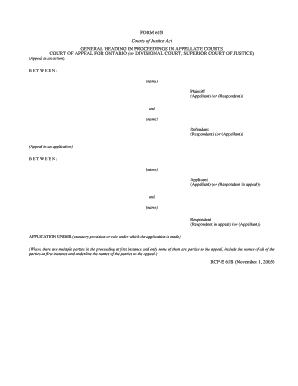
Filling out the Canada Form 61B - Ontario is essential for individuals involved in appellate court proceedings in Ontario. This guide provides comprehensive instructions to help users navigate the online form accurately and efficiently.
Follow the steps to fill out Canada Form 61B - Ontario online.
- Press the ‘Get Form’ button to access the form and open it in the editor.
- In the general heading section, indicate which court is applicable by selecting either the Court of Appeal for Ontario, Divisional Court, or Superior Court of Justice.
- In the first section, fill in the names of the parties involved in the case. Clearly designate the role of each party, indicating who is the Plaintiff and who is the Defendant for an appeal in an action.
- If the case relates to an application, fill in the names of the Applicant and Respondent, ensuring you specify their roles as needed.
- In the section labeled 'APPLICATION UNDER,' provide the relevant statutory provision or rule under which the application is being made.
- If there are multiple parties in the initial proceedings, include all their names here, underlining only those involved in the appeal.
- After completing the form, review all entries for accuracy and completeness.
- Users can save changes, download, print, or share the completed form as needed.
Start filling out your Canada Form 61B - Ontario online today.
If you want to change a final order or written agreement, and the other party does not agree to the change, you need to: identify and fill out your documents. get your motion to change issued by the court. serve all your documents. file proof of service.