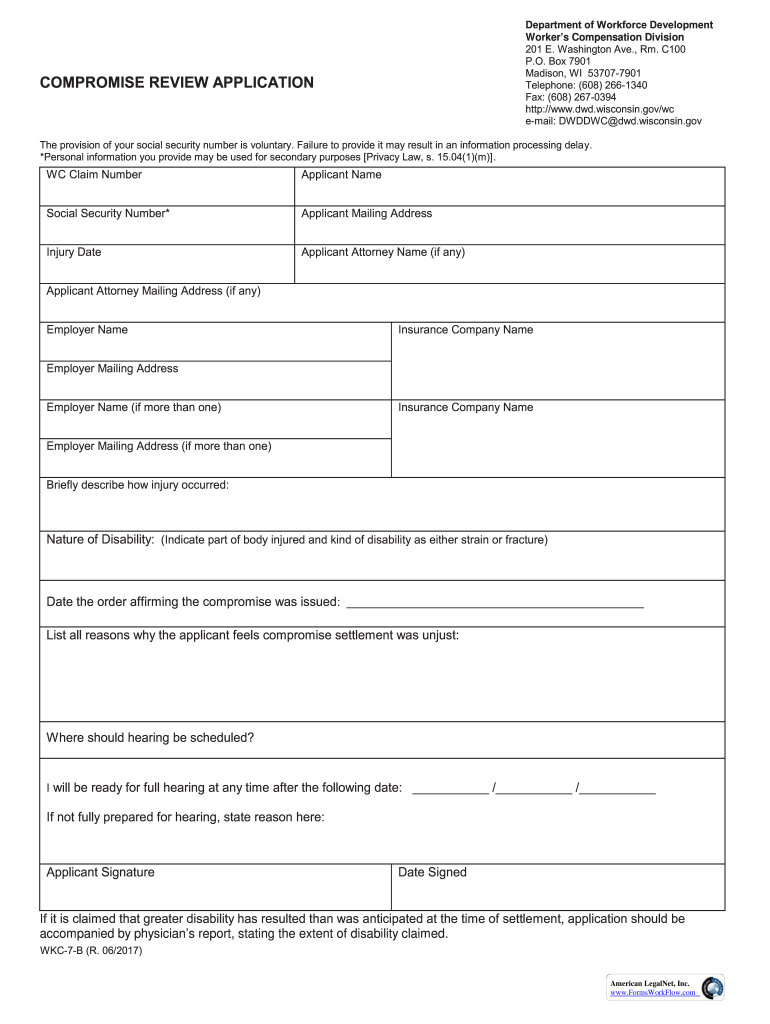
Department of Workforce Development Workers Compensation Division 201 E. Washington Ave., Rm. C100 P.O. Box 7901 Madison, WI 537077901 Telephone: (608) 2661340 Fax: (608) 2670394 http://www.dwd.wisconsin.gov/wc.
Loading

Open form follow the instructions

Easily sign the form with your finger

Send filled & signed form or save
How to fill out the WI WKC-7-B online
Filling out the WI WKC-7-B form can seem daunting, but with clear instructions, you can navigate it with ease. This guide will provide a step-by-step approach to help you complete the form online accurately.
Follow the steps to effectively complete your application.
- Click ‘Get Form’ button to obtain the form and open it in the editable format.
- Begin by entering your WC claim number in the designated field. This number is essential for processing your application.
- Fill in your full name as the applicant in the Applicant Name section. Ensure that it matches your official identification.
- Provide your voluntary social security number in the corresponding field. Remember that not providing it may delay processing.
- Enter your mailing address accurately in the Applicant Mailing Address section.
- Specify the date of your injury. This information is crucial for your claim.
- If you have legal representation, include your attorney's name and address in the respective fields. If not, you may leave them blank.
- Next, provide the employer's name and insurance company name. If applicable, fill in details for additional employers.
- In the brief description section, clearly outline how your injury occurred. Be concise but informative.
- Indicate the nature of your disability by stating the affected body part and the type of disability (strain or fracture).
- Record the date when the order affirming the compromise was issued. This is important for processing your application.
- List the reasons why you believe the compromise settlement was unjust. Provide detailed explanations to strengthen your application.
- Indicate where you would like the hearing to be scheduled. Provide a clear location.
- State the earliest date you will be ready for a full hearing. This helps in scheduling your case.
- If you are not fully prepared for a hearing, provide a brief explanation of why.
- Sign the application in the designated space and enter the date signed, confirming the accuracy of the information.
- After completing all sections, review the form for accuracy. You can save changes, download, print, or share the form as needed.
Encourage your peers to complete their applications online!
Experience a faster way to fill out and sign forms on the web. Access the most extensive library of templates available.
Related content
Compromise Review Application ; Document Number: WKC-7-B ; Description: This form is used...
Jan 14, 2021 — The vast majority of Wisconsin employers are subject to the Worker's...
If it is claimed that greater disability has resulted than was anticipated at the time of...
Use professional pre-built templates to fill in and sign documents online faster. Get access to thousands of forms.
If you believe that this page should be taken down, please follow our DMCA take down process here.