Loading
Get Donation Form - Unicef - Malaysia
How it works
-

Open form follow the instructions
-

Easily sign the form with your finger
-

Send filled & signed form or save
How to fill out the donation form - UNICEF - Malaysia online
This guide provides step-by-step instructions on how to complete the UNICEF Malaysia Donation Form online. Following these instructions will help ensure that your donation is processed smoothly and efficiently.
Follow the steps to complete your donation form
- Click ‘Get Form’ button to obtain the form and open it in the editor.
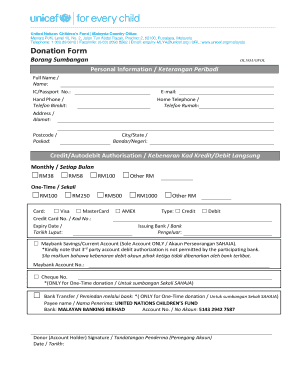
- Enter your personal information in the designated fields. Provide your full name, identity card or passport number, email address, and phone numbers. Ensure that all information is accurate for proper identification.
- Fill out your address details. Include your street address, postcode, and city or state to facilitate communication regarding your donation.
- Choose your donation type by selecting either the monthly or one-time donation option. Indicate the amount you wish to donate by selecting the appropriate checkbox or writing in an alternative amount.
- Select your preferred payment method. Choose from credit/debit card options, ensuring you specify the type of card and provide the card number and expiry date.
- If using a cheque for a one-time donation, indicate the cheque number in the provided field.
- For bank transfers related to one-time donations, use the specified payee name and bank details provided in the form, ensuring the accuracy of the account number.
- Sign the form to authorize the donation and date it accordingly.
- Review your completed form for any errors or missing information before finalizing the submission.
- After ensuring all details are correct, save any changes, download, print, or share the form as needed.
Complete your donation form online to support UNICEF Malaysia today!
You can contact the Customer Service team on 1300 30 0010 (9.00am - 5.30pm) or email donorcare@unicef.my to confirm their identity.