Loading
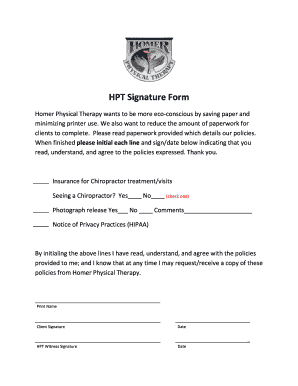
Get Homer Physical Therapy Hpt Signature Form_dsa
How it works
-

Open form follow the instructions
-

Easily sign the form with your finger
-

Send filled & signed form or save
How to fill out the Homer Physical Therapy HPT Signature Form_DSA online
Completing the Homer Physical Therapy HPT Signature Form_DSA online is a crucial step for users seeking chiropractic treatment. This guide provides clear instructions on filling out the form efficiently and accurately, ensuring that all necessary information is provided.
Follow the steps to complete the form successfully.
- Press the ‘Get Form’ button to access the form and open it in the online editor.
- Begin by checking the appropriate box regarding whether you are seeing a chiropractor. Indicate 'Yes' or 'No' by marking the corresponding option.
- Next, find the photograph release section. Indicate your preference by checking 'Yes' or 'No'. You may also provide any comments in the designated space.
- Read the Notice of Privacy Practices (HIPAA) information provided in the form carefully to ensure you understand your rights.
- Confirm that you have read, understood, and agree with the policies by initialing each line in the appropriate section.
- Print your name in the specified area provided for identification.
- Provide your signature in the designated client signature space, followed by completing the date section.
- If required, have an HPT witness sign the form and fill in the date next to their signature.
- After reviewing all entered information and ensuring its accuracy, you can choose to save the changes, download a copy for your records, print it, or share it as needed.
Complete your documents online to streamline your experience.