Loading
Get Canada Nlesd 311a 2015-2026
How it works
-

Open form follow the instructions
-

Easily sign the form with your finger
-

Send filled & signed form or save
How to fill out the Canada NLESD 311A online
This guide provides clear instructions for filling out the Canada NLESD 311A form online. Whether you are a parent, guardian, or independent student, following these steps will ensure that you correctly complete the form and provide necessary information for registration.
Follow the steps to fill out the Canada NLESD 311A form effectively.
- Click ‘Get Form’ button to obtain the form and open it in the editor.
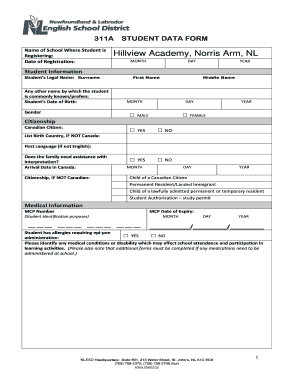
- Begin by entering the school where the student is registering. You will need to provide the name of the school, along with the date of registration, including the month, day, and year.
- In the 'Student Information' section, complete the fields for the student’s legal name, any other preferred names, date of birth, and gender. Ensure you clearly mark the gender option that applies.
- Next, provide citizenship details. Indicate if the student is a Canadian citizen, and if not, list the country of birth. If applicable, provide information about the first language and whether interpretation assistance is needed.
- Fill in the arrival date in Canada and citizenship information if the student is not a Canadian citizen. Indicate the relevant status such as permanent resident or student authorization.
- In the 'Medical Information' section, enter the MCP number and expiry date. Note any allergies requiring an and identify any medical conditions or disabilities affecting school participation.
- Proceed to the 'Parent/Guardian Information' section. Specify the relationship of the individuals to the student and include relevant contact details such as names, phone numbers, and email addresses.
- Ensure to note the primary contact for school and how they wish to receive automated messages regarding school-related notifications.
- Provide emergency contact details for individuals who can be reached if necessary, including their names, relationships to the student, and contact information.
- Indicate the program placement options and transportation type, if applicable. Include information on siblings attending the same school, if relevant.
- Complete the 'Previous School Information' section by entering the name and location of the last school attended. Note the last grade attended and reason for leaving.
- Finally, review the declaration statement, confirm the accuracy of the information provided, and sign with the date.
- Once all fields are filled, save your changes. You can download, print, or share the form as needed for submission.
Complete the Canada NLESD 311A form online today to ensure timely processing of the student registration.
Over 250 schools, including 5 alternate sites; over 10,000 employees.