Loading
Get Md Vision Care Claim Form 2008-2026
How it works
-

Open form follow the instructions
-

Easily sign the form with your finger
-

Send filled & signed form or save
How to fill out the MD Vision Care Claim Form online
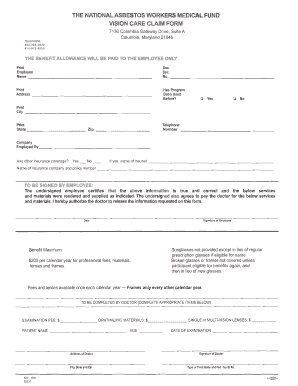
This guide provides comprehensive instructions on how to fill out the MD Vision Care Claim Form online. By following these detailed steps, users can confidently submit their claims while ensuring all necessary information is accurately provided.
Follow the steps to complete the form online with ease.
- Press the ‘Get Form’ button to access the MD Vision Care Claim Form and open it within your document editor.
- In the first section, enter your personal details. Fill in your full name, address, social security number, and contact information accurately.
- Indicate whether you have previously used the vision care program by selecting 'Yes' or 'No'.
- Specify the name of your employer in the 'Company Employed By' field.
- If you have other insurance coverage, indicate 'Yes' or 'No.' If yes, provide the name of the insured.
- The employee must sign and date the form, certifying the accuracy of the information provided and agreeing to pay for services rendered.
- The healthcare provider needs to complete their section by entering details regarding the examination fee, materials, patient name, age, and the type of lenses prescribed.
- Include the date of examination and the doctor’s address along with their signature and printed name with tax identification number.
- Review all entries for accuracy and completeness.
- Once finalized, save the changes, and choose to download, print, or share the completed form as needed.
Complete your claims online today to ensure timely processing and payment.
To claim insurance on your glasses, you will first need to gather your receipts and complete the MD Vision Care Claim Form. It's important to provide all requested information accurately. Submit your form and receipts to your insurance provider to begin the claims process.