Loading
Get Wa Dot 560-025 2020
How it works
-

Open form follow the instructions
-

Easily sign the form with your finger
-

Send filled & signed form or save
How to fill out the WA DOT 560-025 online
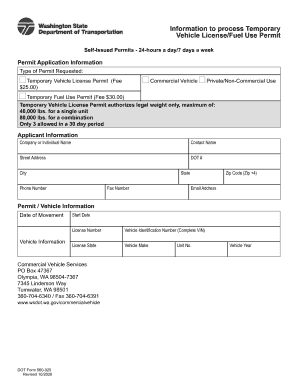
This guide provides users with easy-to-follow instructions for completing the WA DOT 560-025 form online. Whether you are applying for a temporary vehicle license or a fuel use permit, this comprehensive guide will assist you in navigating each section of the form effectively.
Follow the steps to complete the form accurately.
- Click ‘Get Form’ button to obtain the form and open it in the editor.
- In the 'Type of Permit Requested' section, select either 'Temporary Vehicle License Permit' or 'Temporary Fuel Use Permit' based on your needs. Please note the fees associated with each permit type.
- For the 'Applicant Information' section, input the company or individual name, contact name, street address, DOT number, city, state, phone number, fax number, and zip code along with the email address.
- In the 'Permit / Vehicle Information' section, provide the date of movement, vehicle information including start date, license number, full Vehicle Identification Number (VIN), license state, vehicle make, unit number, and vehicle year.
- Review all the information you have entered to ensure accuracy, as any errors can delay the processing of your permit.
- Once you have completed the form, you can save your changes, download, print, or share the form as needed.
Complete your documents online today for a smoother application process.