Loading
Form preview
  • US Legal Forms
  • Other Templates
  • Social Forms
  • Maryland Social Forms
  • Md Dhr/fia 4350 2013

Get Md Dhr/fia 4350 2013-2026

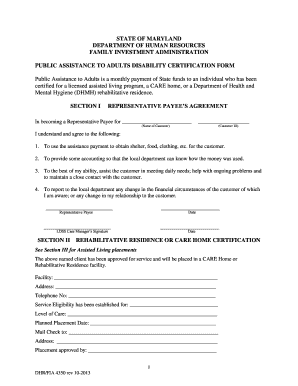
funds to an individual who has been certified for a licensed assisted living program, a CARE home, or a Department of Health and Mental Hygiene (DHMH) rehabilitative residence. SECTION I REPRESENTATIVE PAYEE’S AGREEMENT In becoming a Representative Payee for __________________________ ___________________ (Name of Customer) (Customer ID) I understand and agree to the following: 1. To use the assistance payment to obtain shelter, food, clothing, etc. for the customer. 2. To provide some a.

How it works

  1. Open form

    Open form follow the instructions

  2. Easily sign form

    Easily sign the form with your finger

  3. Share form

    Send filled & signed form or save

How to fill out the MD DHR/FIA 4350 online

Filling out the MD DHR/FIA 4350 form is an essential step for individuals seeking public assistance in Maryland. This guide provides clear, step-by-step instructions on completing this online form easily and accurately.

Follow the steps to complete the online form effectively.

  1. Click the ‘Get Form’ button to access the MD DHR/FIA 4350 document and open it in your editor of choice.
  2. In Section I, provide the name of the customer and their unique Customer ID. Ensure that the Representative Payee understands their responsibilities as stated in the agreement.
  3. Proceed to Section II and complete the details for the Rehabilitative Residence or Care Home certification. This includes the facility name, address, telephone number, service eligibility, level of care, planned placement date, and mailing address for checks.
  4. In Section III, fill out the medical report about the patient. Enter the patient's name, date of birth, name of the licensed professional or physician, and their contact information. Ensure to address any necessary protective living arrangement justification.
  5. Continue filling in the presenting symptoms and diagnoses as observed by the healthcare provider. Confirm any limitations in hearing and speaking, and check the appropriate boxes.
  6. Provide information regarding the patient's mental health and any violent behaviors if applicable. Detail any additional comments or recommendations as required.
  7. Complete Section IV about visual limitations, including findings and prognosis. Sign and print the name of the licensed professional, including their title, contact information, and license or federal ID number.
  8. Review all sections of the form to ensure accuracy. Once completed, save your changes and choose to download, print, or share the form as needed.

Start your document process today by filling out the MD DHR/FIA 4350 online!

Get form

Experience a faster way to fill out and sign forms on the web. Access the most extensive library of templates available.
Get form

Related content

paa - Maryland Department of Human Services
The Family Investment Administration created the Public Assistance to Adults Disability...
Learn more
PAA Section 200 Application Revised 1011...
The Public Assistance Disability Certification form (DHR/FIA 4350) 4. ... The attorney...
Learn more

Related links form

Ao121com Form 2015 AO-85a - U.S. Courts - Uscourts 2005 Expense Ledgers Form 2010 Filing Certain Applications With Immigration Court

Questions & Answers

Get answers to your most pressing questions about US Legal Forms API.

Contact support

In the context of Maryland's Department of Human Services, FiA stands for the Family Investment Administration. This administration is responsible for managing programs that assist families facing financial hardships. By knowing about FiA and its connection to the MD DHR/FIA 4350, you can make informed choices about available support.

DHS stands for the Department of Human Services in Maryland. This agency is dedicated to enhancing the quality of life for residents through a range of services, including economic support and child welfare initiatives. Understanding DHS's role further aids in accessing support linked to the MD DHR/FIA 4350.

The Family Investment Program offers financial assistance and supportive services to eligible families in Maryland. This program helps families achieve self-sufficiency through various initiatives. By exploring programs under the MD DHR/FIA 4350, you can access essential resources designed to uplift Maryland families.

To check the status of your food stamps in Maryland, you can visit the Maryland Department of Human Services website or call your local office directly. They provide detailed guidance on how to view your application status. Using resources like the MD DHR/FIA 4350 helps ensure you stay on top of your benefits.

FiA stands for Family Investment Administration in the context of Maryland's Department of Human Services. This division plays a crucial role in developing policies and administering programs that support families financially. Familiarizing yourself with FiA helps you leverage benefits related to the MD DHR/FIA 4350.

If you have questions regarding your food stamps in Maryland, you can contact the local Department of Social Services. They will provide information on how to apply, check your status, or resolve any issues you might encounter. For a seamless experience, especially with MD DHR/FIA 4350 benefits, it's essential to reach out to the right department.

The head of the Department of Human Services (DHS) in Maryland is appointed by the governor. This individual oversees various programs aimed at improving the welfare of Maryland residents. Understanding the leadership helps you navigate services related to the MD DHR/FIA 4350 and access available resources effectively.

Uploading documents to your Department of Human Resources (DHR) is important for maintaining your benefits. Start by logging into your account on the DHR website and locating the document upload section. Select the files you need to submit and follow the instructions. Using the MD DHR/FIA 4350 program can help streamline your experience and ensure you meet the requirements efficiently.

To upload documents to your patient portal, log in with your username and password. Look for the option that allows document uploads, and follow the simple prompts to attach your files. This process is essential for ensuring your medical records are updated. For any potential benefits or financial concerns, consider the MD DHR/FIA 4350 program as a valuable resource.

To upload documents to your SNAP account, log into the SNAP service portal provided by your state. In your account, you will see a section for uploading required documents. Select the appropriate files, and then upload them to submit for review. If you're unsure about what documents you need, the MD DHR/FIA 4350 can provide guidance specific to your situation.

Get This Form Now!

Use professional pre-built templates to fill in and sign documents online faster. Get access to thousands of forms.
Get form
If you believe that this page should be taken down, please follow our DMCA take down processhere.
Get MD DHR/FIA 4350
Get form
  • Adoption
  • Bankruptcy
  • Contractors
  • Divorce
  • Home Sales
  • Employment
  • Identity Theft
  • Incorporation
  • Landlord Tenant
  • Living Trust
  • Name Change
  • Personal Planning
  • Small Business
  • Wills & Estates
  • Packages A-Z
  • Affidavits
  • Bankruptcy
  • Bill of Sale
  • Corporate - LLC
  • Divorce
  • Employment
  • Identity Theft
  • Internet Technology
  • Landlord Tenant
  • Living Wills
  • Name Change
  • Power of Attorney
  • Real Estate
  • Small Estates
  • Wills
  • All Forms
  • Forms A-Z
  • Other Templates
  • Legal Hub
  • About Us
  • Help Portal
  • Legal Resources
  • Blog
  • Affiliates
  • Contact Us
  • Delete My Account
  • Site Map
  • Industries
  • Forms in Spanish
  • Localized Forms
  • State-specific Forms
  • Forms Kit
  • Real Estate Handbook
  • All Guides
  • Notarize
  • Incorporation services
  • For Consumers
  • For Small Business
  • For Attorneys
  • USLegal
  • FormsPass
  • pdfFiller
  • signNow
  • altaFlow
  • DocHub
  • Instapage
Form Packages
  • Adoption
  • Bankruptcy
  • Contractors
  • Divorce
  • Home Sales
  • Employment
  • Identity Theft
  • Incorporation
  • Landlord Tenant
  • Living Trust
  • Name Change
  • Personal Planning
  • Small Business
  • Wills & Estates
  • Packages A-Z
Form Categories
  • Affidavits
  • Bankruptcy
  • Bill of Sale
  • Corporate - LLC
  • Divorce
  • Employment
  • Identity Theft
  • Internet Technology
  • Landlord Tenant
  • Living Wills
  • Name Change
  • Power of Attorney
  • Real Estate
  • Small Estates
  • Wills
  • All Forms
  • Forms A-Z
  • Other Templates
Customer Service
  • Legal Hub
  • About Us
  • Help Portal
  • Legal Resources
  • Blog
  • Affiliates
  • Contact Us
  • Delete My Account
  • Site Map
  • Industries
  • Forms in Spanish
  • Localized Forms
  • State-specific Forms
  • Forms Kit
Legal Guides
  • Real Estate Handbook
  • All Guides
Prepared for you
  • Notarize
  • Incorporation services
Our Customers
  • For Consumers
  • For Small Business
  • For Attorneys
Our Sites
  • USLegal
  • FormsPass
  • pdfFiller
  • signNow
  • altaFlow
  • DocHub
  • Instapage
Social Media
Call us now toll free:
+1 833 426 79 33
As seen in:
© Copyright 1999-2026 airSlate Legal Forms, Inc. 17 Station Street, Suite 303, Brookline, MA 02445
  • Your Privacy Choices
  • Terms of Service
  • Privacy Notice
  • Content Takedown Policy
  • Bug Bounty Program