: l l l l l be a U.S. citizen be 18 years old (you may pre-register at 16 or 17 but cannot vote until you are 18) not be in prison for a felony conviction not claim the right to vote elsewhere not found to be incompetent by a court 1-800-367-868 : 1-800-367-8683 Use the NYS Voter Registration Application to Register.
Loading

Open form follow the instructions

Easily sign the form with your finger

Send filled & signed form or save
How to fill out the NY MV-232 online
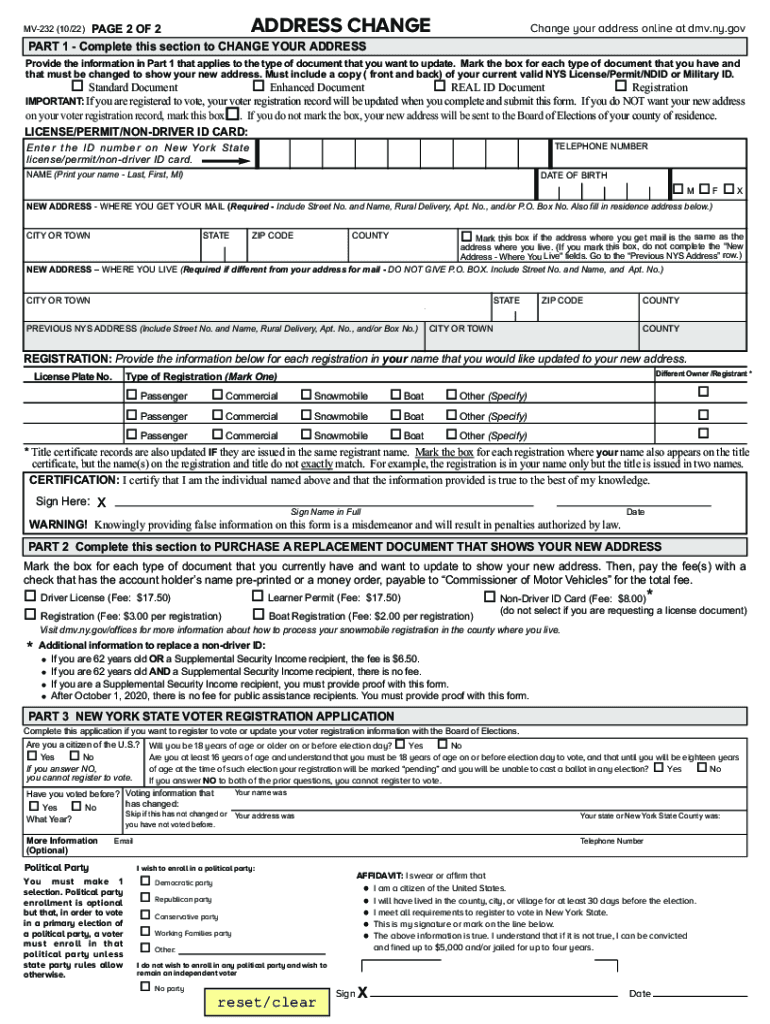
The NY MV-232 form is essential for individuals looking to change their address with the New York State Department of Motor Vehicles. This guide provides simple, step-by-step instructions to help you easily navigate the online process.
Follow the steps to expertly complete the NY MV-232 form online.
- Press the ‘Get Form’ button to access the MV-232 form and open it in your editor of choice.
- In Part 1, complete the fields that apply to the document you are updating. Be sure to indicate whether you have a Standard Document, Enhanced Document, REAL ID Document, or a Registration by marking the appropriate boxes.
- Enter your name, date of birth, and telephone number as specified. Ensure that you include the ID number from your New York State license, permit, or non-driver ID card.
- Fill out the 'New Address - Where You Get Your Mail' section with correct address details. If your mailing address is the same as your residence, mark the designated box.
- If your residence address differs from your mailing address, complete the 'New Address – Where You Live' section accordingly.
- Provide your previous NYS address in the corresponding fields, including street number and name.
- In the registration section, enter information for each registration in your name that needs updating to your new address.
- In the Certification section, sign your name and date the form. Make sure that the information you provided is true to your knowledge.
- If you are requesting a new document, complete Part 2, marking the relevant document type and preparing the payment.
- Finalize by saving your completed form, downloading a copy, printing it, or sharing it as needed. Ensure to mail it to the specified DMV address.
Complete your address change online now to ensure your records are up to date!
Experience a faster way to fill out and sign forms on the web. Access the most extensive library of templates available.
Related content
Change your address online at dmv.ny.gov. PAGE 1 OF 2. MV-232 (1/20). OFFICE USE ONLY...
"Theory", in A. J. Bard and M. V. Mirkin (Eds.), Scanning Electrochemical ... 2nd Edition...
You may print form MV-232 (Change of Address) by going to the DMV web site at...
Use professional pre-built templates to fill in and sign documents online faster. Get access to thousands of forms.
If you believe that this page should be taken down, please follow our DMCA take down process here.