Loading
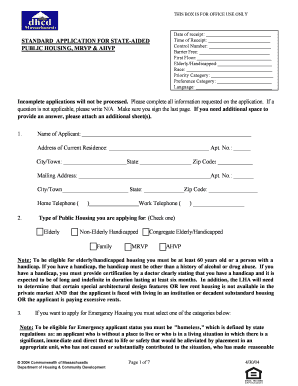
Get Fall River Housing Application Online
How it works
-

Open form follow the instructions
-

Easily sign the form with your finger
-

Send filled & signed form or save
How to fill out the Fall River Housing Application Online
Filling out the Fall River Housing Application online can seem daunting, but this guide will help you navigate through each section of the form with ease. By following these steps, you will ensure that your application is complete and submitted correctly.
Follow the steps to complete your application online.
- Click ‘Get Form’ button to obtain the form and open it in the editor.
- Begin by entering your personal information in the designated fields. This includes your name, current address, and mailing address if different. Ensure to include all necessary details such as apartment number, city, state, and zip code.
- Provide your contact information, including both home and work telephone numbers. It is crucial to ensure that these numbers are accurate so that the housing authority can reach you if needed.
- Select the type of public housing you are applying for. Check the appropriate box for either elderly, non-elderly handicapped, congregate elderly/handicapped, family, MRVP, or AHVP. Refer to the eligibility criteria mentioned in the application if needed.
- If you are applying for Emergency Housing, select a priority category that applies to your situation from the listed options. Fill out the required details to substantiate your claim.
- Complete the local preference and veteran’s preference sections, if applicable. This includes providing employment information and documenting military service dates if you are applying for veteran’s preference.
- Outline any special needs or requests for accommodations you may have related to a disability. Make sure to specify any necessary features, such as a wheelchair-accessible unit.
- List the number of bedrooms needed and confirm your current living situation, ensuring to attach any required documents if you are part of a transitional housing program.
- Complete the sections on household composition and income. You will need to provide details for each member of the household, including their relationship to you, Social Security number, sex, date of birth, and occupation.
- When finished, review the entire application to ensure all sections are completed correctly. If any question is not applicable, write 'N/A'. Remember to sign the last page certifying that all information you provided is true and accurate.
- Finally, save your application changes, download a copy for your records, or print the application if needed. Make sure to also share the completed form with any required parties as directed.
Complete your Fall River Housing Application online today to ensure you have access to the housing you need.
If you have immediate housing needs, are experiencing or at risk of experiencing homelessness, please find resources and information here: dhs.dc.gov/service/homeless-services. You can also contact the Department of Human Services (DHS) shelter hotline at (202) 399-7093.