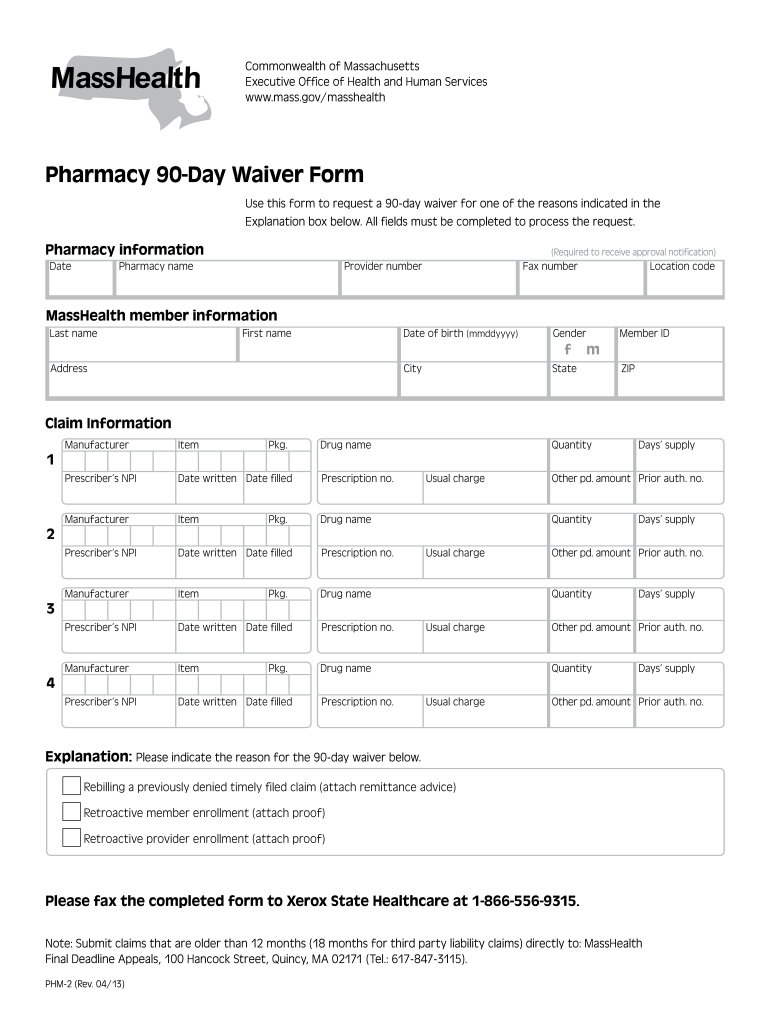
D in the Explanation box below. All fields must be completed to process the request. Pharmacy information Date (Required to receive approval notification) Pharmacy name Provider number Fax number Location code MassHealth member information Last name First name Date of birth (mmddyyyy) Gender f Address City Member ID m State ZIP Claim Information Manufacturer Item Pkg. Drug name Prescriber’s NPI Date written Date filled Prescription no. Manufacturer It.
Loading

Open form follow the instructions

Easily sign the form with your finger

Send filled & signed form or save
How to fill out the MA PHM-2 online
The MA PHM-2 form is essential for requesting a 90-day waiver for specific pharmacy-related reasons in Massachusetts. This guide will provide clear, step-by-step instructions for completing the form online to ensure a smooth submission process.
Follow the steps to complete the MA PHM-2 form online.
- Press the ‘Get Form’ button to access the form, which will open it in your online editing tool.
- Begin with the pharmacy information section. Fill in the date required to receive approval notification, then provide the pharmacy name, provider number, fax number, and location code.
- Proceed to the MassHealth member information section. Enter the last name, first name, date of birth (in mmddyyyy format), gender, address, city, state, ZIP, and the member ID.
- Move to the claim information section. Here, you will need to enter details for up to four prescriptions. For each entry, provide the manufacturer, item, package size, drug name, prescriber’s NPI, the date written, date filled, prescription number, quantity, days’ supply, usual charge, other paid amount, and prior authorization number.
- In the explanation box, select the reason for requesting the 90-day waiver. Choose from rebilling a previously denied timely filed claim, retroactive member enrollment, or retroactive provider enrollment and attach the required documentation if applicable.
- After verifying all fields are complete and accurate, you can save changes, download the form, print it, or share it as needed. When ready, submit the completed form by fax to Xerox State Healthcare at 1-866-556-9315.
Complete your MA PHM-2 form online today for an efficient submission process.
Experience a faster way to fill out and sign forms on the web. Access the most extensive library of templates available.
Related content
Jul 1, 2025 — 2 The PHM Program is a part of CalAIM, which is a long-term commitment to...
After completing this MPH core course, students will be able to explain the contribution...
Chlorinated solvents and their transformation products are among the most abundant...
Get answers to your most pressing questions about US Legal Forms API.
Is PFML taxable?
Yes, PFML is considered taxable income. Both the IRS and the Massachusetts Department of Revenue treat these benefits as taxable. When filing using the MA PHM-2, ensure you include all income received from PFML in your total taxable income. Accurate reporting will facilitate smooth processing of your returns.
Are Massachusetts PFML benefits taxable income?
Yes, Massachusetts PFML benefits are taxable income on both state and federal levels. As you prepare your taxes, it’s essential to report these benefits correctly to avoid any complications. Review your MA PHM-2 documentation to determine how much you received and how to report it effectively. Staying informed can save you from surprises during tax season.
Why can't I efile my MA state return?
There may be several reasons why you cannot e-file your Massachusetts state return, including form errors or missing documentation. Make sure all required forms, like the MA PHM-2, are complete and valid before attempting to e-file. If you still encounter issues, consider reaching out to a support resource, such as USLegalForms, for assistance. They can help resolve e-filing concerns.
Where do I mail my state return?
Your state return should be mailed to the address specified in the Massachusetts Department of Revenue instructions. This address may differ based on whether you are submitting a payment or expecting a refund. To ensure timely processing, always refer to the MA PHM-2 guidance on where to send your mail. Check twice before you drop it in the mailbox.
Where do I file my Massachusetts state tax return?
You can file your Massachusetts state tax return online or via mail, depending on your preference. Direct online submission can streamline the process, while mailing your return requires sending it to the correct address, which you can find in the MA PHM-2 documentation. Ensure all forms are completed accurately to avoid processing delays.
Where to mail Massachusetts Form 3?
To mail Massachusetts Form 3, direct it to the appropriate address indicated on the form itself. Usually, this address varies based on your filing condition, such as whether you owe taxes. Properly mailing your Form 3 ensures it reaches the right department for processing. For further clarity, consult the MA PHM-2 instructions.
Can I file just my state taxes with FreeTaxUSA?
Yes, you can file just your state taxes using FreeTaxUSA. This platform allows you to complete your Massachusetts state tax return, including relevant forms such as the MA PHM-2. It provides an easy-to-navigate interface to help guide you through the filing process. Be sure to follow their instructions for an efficient experience.
Where do I file my MA form 2?
For filing your MA form 2, you will need to send it to the Massachusetts Department of Revenue. The form may be filed online or by mail, depending on your preference. If you are unsure about the process, consider using USLegalForms for guidance and resources related to the MA PHM-2. This platform simplifies form submission and enhances compliance.
Where do I file my annual report in Massachusetts?
You should file your annual report with the Massachusetts Secretary of the Commonwealth. This can typically be done online via their official website or by mail, which includes certain forms associated with the MA PHM-2. Completing this process accurately ensures your business stays in good standing. Look for specific instructions on the Secretary of State’s website.
Why am I not able to efile my tax return?
There could be various reasons preventing you from efiling your tax return, including incompatible forms or exceeding income thresholds. Additionally, a lack of proper identification or errors in prior submissions may restrict your ability to efile. Use resources like uslegalforms to identify and rectify any issues before filing.
Use professional pre-built templates to fill in and sign documents online faster. Get access to thousands of forms.
If you believe that this page should be taken down, please follow our DMCA take down process here.