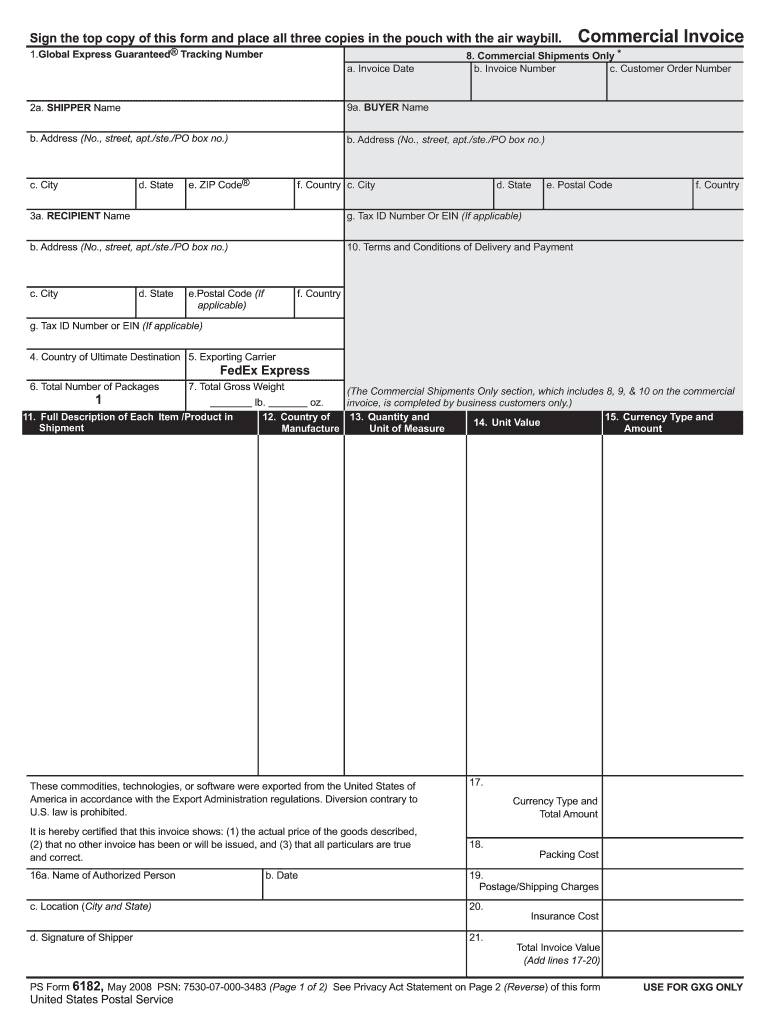
Nts Only * b. Invoice Number c. Customer Order Number 2a. SHIPPER Name 9a. BUYER Name b. Address (No., street, apt./ste./PO box no.) b. Address (No., street, apt./ste./PO box no.) c. City d. State e. ZIP Code f. Country c. City d. State e. Postal Code 3a. RECIPIENT Name g. Tax ID Number Or EIN (If applicable) b. Address (No., street, apt./ste./PO box no.) f. Country 10. Terms and Conditions of Delivery and Payment c. City d. State e.Postal Code (If applicable) f. Country g.
Loading

Open form follow the instructions

Easily sign the form with your finger

Send filled & signed form or save
How to fill out the USPS PS Form 6182 online
Filling out the USPS PS Form 6182 online can streamline the process of sending important documents and packages. This guide provides step-by-step instructions to help you accurately complete the form without confusion.
Follow the steps to successfully complete the USPS PS Form 6182.
- Press the ‘Get Form’ button to access the form and open it in the online editor.
- In the first section, enter the Global Express Guaranteed® tracking number and the invoice date. This information is essential for tracking your shipment.
- Provide the shipper's full name and complete address, including city, state, ZIP code, and country.
- Enter the recipient's full name and complete address, ensuring all details such as city, state, postal code, and country are accurately noted.
- Indicate the country of ultimate destination where the shipment is headed.
- Specify the exporting carrier, which should be FedEx Express for this form.
- Enter the total number of packages. Remember that Global Express Guaranteed shipments are limited to one package.
- Fill in the total gross weight of the shipment.
- Complete the Commercial Shipments Only section by adding the invoice date, invoice number, and customer order number.
- Provide the buyer's information, including their full name, address, and any relevant tax ID or EIN number.
- List the terms and conditions of delivery and payment for the shipment.
- Describe each item in the shipment thoroughly and indicate the country of manufacture for each product.
- Record the quantity, unit of measure, and the unit value for each item.
- Include the total amount and specify the currency type used for the transaction.
- Sign and date the form, providing your location.
- After completing all sections, save your changes, and proceed to download, print, or share the form as needed.
Complete your USPS PS Form 6182 online today for a seamless shipping experience.
Experience a faster way to fill out and sign forms on the web. Access the most extensive library of templates available.
Related content
PS Form 6182, Commercial Invoice, is a handwritten form that a customer uses for Global...
Customs declaration forms are available without charge at Post Office ... PS Form 6182...
USPS. Address: UPS. Address: Broadway Bldg. (BB100) Interplant Mail ... MHW6182-6/0...
Get answers to your most pressing questions about US Legal Forms API.
How do I order certified mail forms?
Visit a local post office and obtain a Certified Mail Form 3800. This form contains a green and white sticker that includes a barcode, which will allow you to track your mail through the USPS. The form also contains a perforated receipt, which serves as proof that you mailed the item.
Does USPS require commercial invoice?
A commercial invoice may be required for personal shipments as well as for commercial shipments. If a commodity is not listed or if there is any doubt, complete a commercial invoice for the shipment. The Commercial Invoice must be completed in English. Three copies must accompany the shipment.
What is a 1583 USPS form?
USPS Form 1583 authorizes us to accept mail in your name. It does not change your address with USPS or tell us where to forward your mail. You'll need to inform your senders of your new address and change your address with any important contacts, such as banks and business registries.
How do I get a form 1583?
You can download your form directly from the USPS. If you are working with a commercial mail receiving company, the company may have the USPS 1583 on hand with their information already filled out.
How do I get a USPS form 3575?
A Change of Address (COA) request can be temporary or permanent. Both options can be requested and completed online or by filling out a PS Form 3575 acquired from your local Post Office™. The PS Form 3575 form can no longer be printed from your home computer.
How do I get USPS forms?
The forms are available in PDF format and can be found at: http://about.usps.com/forms/all-forms.htm. Use the Postal Explorer's Business Rate Calculator to assist you in calculating postage. If a Postal facility is NOT participating in the PostalOne!
Use professional pre-built templates to fill in and sign documents online faster. Get access to thousands of forms.
If you believe that this page should be taken down, please follow our DMCA take down process here.
This form is available in several versions. Select the version you need from the drop-down list below.