Loading
Get Osf Medical Group Z1954 2001-2026
How it works
-

Open form follow the instructions
-

Easily sign the form with your finger
-

Send filled & signed form or save
How to fill out the OSF Medical Group Z1954 online
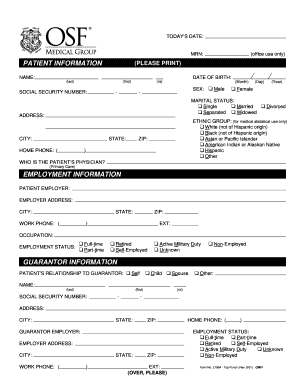
Completing the OSF Medical Group Z1954 online is essential for providing your personal and medical information accurately. This guide will walk you through each section of the form, ensuring that you can submit it with confidence.
Follow the steps to successfully fill out the OSF Medical Group Z1954.
- Click ‘Get Form’ button to obtain the form and open it in the editor.
- Begin by filling in today’s date in the designated field, ensuring the information is accurate.
- Enter the patient information section. Provide the full name, date of birth, social security number, sex, marital status, and address. Ensure all information is printed clearly.
- Fill in the patient's contact details, including home phone number and ethnic group, selecting the appropriate option.
- List the patient's primary physician in the designated section.
- In the employment information section, provide the patient's employer name, employer address, occupation, and employment status from the given options.
- Complete the guarantor information by indicating the relationship to the guarantor (for example, self, child, spouse) and entering their full details.
- If relevant, fill out the emergency and other contact information, including caregiver details and emergency contact name and relationship.
- Provide the patient's insurance information. Enter both primary and secondary insurance details, including the insurance name, policy numbers, and the relationship of the insured to the patient.
- Review all filled information for accuracy and clarity before proceeding.
- Once completed, you can save the changes, download, print, or share the form as needed.
Take the next step by completing the OSF Medical Group Z1954 online today.
If you have additional questions about remote access to any Mission Partner resources, please contact the OSF Service Center at (309) 655-4800.