Loading
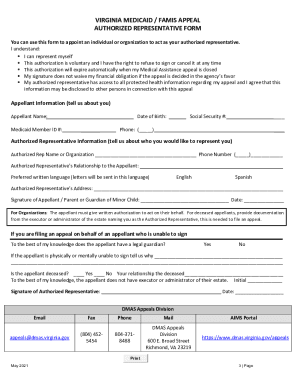
Get Va Medicaid/famis Appeal Authorized Representative Form 2021-2026
How it works
-

Open form follow the instructions
-

Easily sign the form with your finger
-

Send filled & signed form or save
How to fill out the VA Medicaid/Famis Appeal Authorized Representative Form online
Filling out the VA Medicaid/Famis Appeal Authorized Representative Form online can be straightforward with the right guidance. This guide will provide clear steps to help you complete the form effectively and ensure the proper appointment of a representative.
Follow the steps to accurately complete the form online.
- Click ‘Get Form’ button to access the form and open it in the editor.
- Begin by filling out the Appellant Information section. Enter your full name and Medicaid Member ID number. Provide your date of birth and Social Security number. Finally, include your phone number with the area code.
- Next, move to the Authorized Representative Information section. Provide the name or organization of your designated representative along with their phone number. Specify the relationship of the authorized representative to you, the appellant.
- Select the preferred written language for correspondence concerning your appeal, with options for English or Spanish.
- Complete the Authorized Representative’s Address section by filling out the full mailing address.
- Sign the form at the designated area to authorize your representative. If you are a parent or guardian signing on behalf of a minor child, ensure that this is clearly indicated. Include the date of signing.
- If applicable, answer the questions regarding if the appellant is unable to sign. If they have a legal guardian, indicate 'Yes' or 'No' and provide an explanation if necessary.
- Complete the signature area for the authorized representative along with the date.
- After filling out all sections and verifying the information, save your changes, and proceed to download, print, or share the form as necessary.
Start filling out your VA Medicaid/Famis Appeal Authorized Representative Form online today!