Loading
Form preview
  • US Legal Forms
  • Other Templates
  • More Forms
  • More Uncategorized Forms
  • Nz Westpac Kiwisaver Scheme Withdrawal Form 2020

Get Nz Westpac Kiwisaver Scheme Withdrawal Form 2020-2026

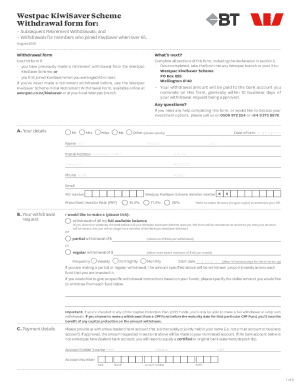
Westpac Kiwi Saver Scheme Withdrawal form for: Subsequent Retirement Withdrawals; and Withdrawals for members who joined Kiwi Saver when over 65. August 2020Withdrawal formats next? Use this form.

How it works

  1. Open form

    Open form follow the instructions

  2. Easily sign form

    Easily sign the form with your finger

  3. Share form

    Send filled & signed form or save

How to fill out the NZ Westpac KiwiSaver Scheme Withdrawal Form online

This guide offers a comprehensive overview on completing the NZ Westpac KiwiSaver Scheme Withdrawal Form online. Navigate through each step and section with clarity and confidence, ensuring your withdrawal request is submitted accurately and efficiently.

Follow the steps to successfully complete your withdrawal form.

  1. Click ‘Get Form’ button to obtain the form and open it for completion.
  2. Begin filling out section A, which captures your personal details. Include your name, date of birth, postal address, phone numbers, email, member number, IRD number, and prescribed investor rate.
  3. Proceed to section B to specify your withdrawal request. Indicate whether you wish to withdraw your entire balance, a partial amount, or set up regular withdrawals. Ensure you provide the amount and the frequency if applicable.
  4. In section C, enter your payment details. Provide the bank account information for where you would like your funds to be transferred, ensuring it is either solely or jointly in your name.
  5. Review the privacy statement in section D, which explains how your personal information will be managed and protected.
  6. In section E, complete the declaration by reading the acknowledgments and adding your signature, confirming that all information is correct.
  7. Follow section F to ensure you have included all necessary documentation, particularly if this is your first withdrawal. Gather required identification and proof of address.
  8. Finally, submit your application as indicated in section G. You can return your completed form and supporting documents to the address provided or visit your local Westpac branch.

Start your online process today by completing the NZ Westpac KiwiSaver Scheme Withdrawal Form.

Get form

Experience a faster way to fill out and sign forms on the web. Access the most extensive library of templates available.
Get form

Related content

EX-2 3 a14-24183_2ex2.htm EX-2 Exhibit 2 This is...
Read more about AFS's divisional brands in the subsequent pages. ... allowing customers to...
Learn more
the new zealand public pension system and...
KiwiSaver is a defined contribution retirement savings plan created to supplement. NZS and...
Learn more

Related links form

Ukrops Employment Application Regis University Office 365 Authorization For Release Of Protected Health Informationphi Ucos Ii Turbo Form

Questions & Answers

Get answers to your most pressing questions about US Legal Forms API.

Contact support

You can withdraw the full value of your Westpac KiwiSaver Scheme account after one year. This excludes any Government contributions (which will be paid back to Inland Revenue) and any amount you've transferred from an Australian complying superannuation scheme.

Moving to any other country After you've been living overseas (not Australia) for 1 year, you can take most of the savings from your KiwiSaver account. You can withdraw: your contributions. your employer's contributions.

You may be eligible to withdraw KiwiSaver savings early in the case of bankruptcy, relationship property, student loans and your death.

Full withdrawals will take around 2-3 weeks to process taking into account making a final Government contribution claim. Partial withdrawals not requiring a Government contribution claim should take around a week to process.

You'll have to be able to show you're experiencing significant financial hardship(opens in new window), which includes: being unable to meet minimum living expenses. being unable to meet mortgage repayments on the home you live in, resulting in your mortgage provider enforcing the mortgage on your property.

To withdraw savings you will need to provide evidence you are suffering significant financial hardship. If your application is accepted you can only withdraw your and your employer's contributions. Significant financial hardship includes when you: cannot meet minimum living expenses.

If you've never made a retirement withdrawal before, use the Westpac KiwiSaver Scheme Initial Retirement Withdrawal Form, available online at westpac.co.nz/kiwisaver or at your local Westpac branch.

Get This Form Now!

Use professional pre-built templates to fill in and sign documents online faster. Get access to thousands of forms.
Get form
If you believe that this page should be taken down, please follow our DMCA take down processhere.
Get NZ Westpac KiwiSaver Scheme Withdrawal Form
Get form
  • Adoption
  • Bankruptcy
  • Contractors
  • Divorce
  • Home Sales
  • Employment
  • Identity Theft
  • Incorporation
  • Landlord Tenant
  • Living Trust
  • Name Change
  • Personal Planning
  • Small Business
  • Wills & Estates
  • Packages A-Z
  • Affidavits
  • Bankruptcy
  • Bill of Sale
  • Corporate - LLC
  • Divorce
  • Employment
  • Identity Theft
  • Internet Technology
  • Landlord Tenant
  • Living Wills
  • Name Change
  • Power of Attorney
  • Real Estate
  • Small Estates
  • Wills
  • All Forms
  • Forms A-Z
  • Other Templates
  • Legal Hub
  • About Us
  • Help Portal
  • Legal Resources
  • Blog
  • Affiliates
  • Contact Us
  • Delete My Account
  • Site Map
  • Industries
  • Forms in Spanish
  • Localized Forms
  • State-specific Forms
  • Forms Kit
  • Real Estate Handbook
  • All Guides
  • Notarize
  • Incorporation services
  • For Consumers
  • For Small Business
  • For Attorneys
  • USLegal
  • FormsPass
  • pdfFiller
  • signNow
  • altaFlow
  • DocHub
  • Instapage
Form Packages
  • Adoption
  • Bankruptcy
  • Contractors
  • Divorce
  • Home Sales
  • Employment
  • Identity Theft
  • Incorporation
  • Landlord Tenant
  • Living Trust
  • Name Change
  • Personal Planning
  • Small Business
  • Wills & Estates
  • Packages A-Z
Form Categories
  • Affidavits
  • Bankruptcy
  • Bill of Sale
  • Corporate - LLC
  • Divorce
  • Employment
  • Identity Theft
  • Internet Technology
  • Landlord Tenant
  • Living Wills
  • Name Change
  • Power of Attorney
  • Real Estate
  • Small Estates
  • Wills
  • All Forms
  • Forms A-Z
  • Other Templates
Customer Service
  • Legal Hub
  • About Us
  • Help Portal
  • Legal Resources
  • Blog
  • Affiliates
  • Contact Us
  • Delete My Account
  • Site Map
  • Industries
  • Forms in Spanish
  • Localized Forms
  • State-specific Forms
  • Forms Kit
Legal Guides
  • Real Estate Handbook
  • All Guides
Prepared for you
  • Notarize
  • Incorporation services
Our Customers
  • For Consumers
  • For Small Business
  • For Attorneys
Our Sites
  • USLegal
  • FormsPass
  • pdfFiller
  • signNow
  • altaFlow
  • DocHub
  • Instapage
Social Media
Call us now toll free:
+1 833 426 79 33
As seen in:
© Copyright 1999-2026 airSlate Legal Forms, Inc. 17 Station Street, Ste. 203, Brookline, MA 02445
  • Your Privacy Choices
  • Terms of Service
  • Privacy Notice
  • Content Takedown Policy
  • Bug Bounty Program