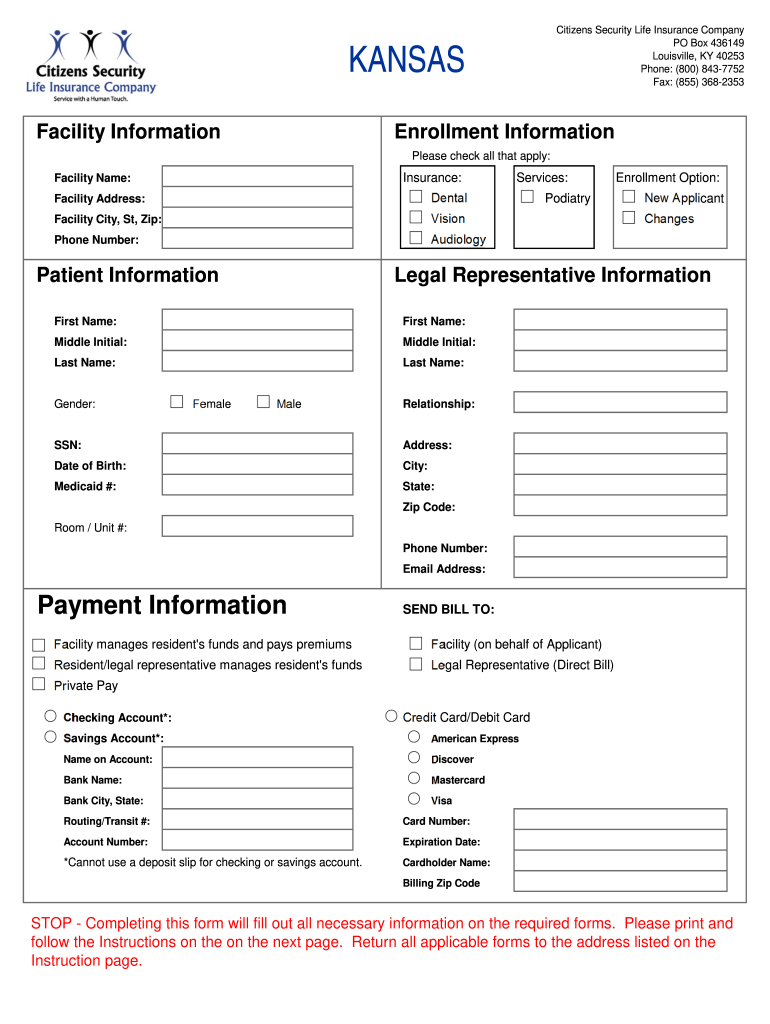
Facility Name: Facility Address: Dental Facility City, St, Zip: Vision Phone Number: Audiology Patient Information First Name: Middle Initial: Middle Initial: Last Name: Last Name: Female Podiatry Enrollment Option: New Applicant Changes Legal Representative Information First Name: Gender: Services: Male Relationship: SSN: Address: Date of Birth: City: Medicaid #: State: Zip Code: Room / Unit #: Phone Number: Email Address: Payment Information SEND BILL TO: Facili.
Loading

Open form follow the instructions

Easily sign the form with your finger

Send filled & signed form or save
How to fill out the KS Citizens Security Enrollment Information online
This guide provides clear and straightforward instructions for users looking to complete the KS Citizens Security Enrollment Information form online. Whether you are a new applicant or making updates, this guide will help you navigate the process successfully.
Follow the steps to complete your enrollment information.
- Click the ‘Get Form’ button to obtain the KS Citizens Security Enrollment Information form in your preferred online format.
- Review the sections carefully. The first section is for insurance type. Indicate the coverage you wish to enroll in by selecting applicable options such as dental, vision, or audiology.
- Fill in the facility information by entering the facility name and address, including city, state, and zip code accurately.
- Provide your personal information, including your first name, middle initial, last name, date of birth, social security number, and Medicaid number, if applicable.
- Complete the legal representative information section if applicable. Include the first name, last name, and relationship to the applicant.
- Choose the enrollment option that applies to you: either as a ‘New Applicant’ or to make ‘Changes’ to an existing enrollment.
- In the payment section, indicate how you would like to manage payments. You can choose if the facility will manage the resident's funds or if the resident/legal representative will handle the billing directly.
- If opting for electronic payment, ensure to complete the relevant section for either credit/debit card or checking/savings account by entering the required details including account numbers and billing information.
- Once all sections are filled out, verify all entered information is correct and complete.
- Save your changes, and prepare to submit the form. Depending on your preferred method, download or print the completed form for mailing or faxing it to the designated address.
Complete your KS Citizens Security Enrollment Information online today for a hassle-free experience.
Experience a faster way to fill out and sign forms on the web. Access the most extensive library of templates available.
Related content
Mar 19, 2025 — You will be able to: Check your Social Security benefit application...
by F SHEET · Cited by 4 — Workers and their families should know what they can expect...
Sep 4, 2025 — In 2025, security firms are implementing multi-layer security checks that...
Get answers to your most pressing questions about US Legal Forms API.
What is the difference between an annual report and an information report in Kansas?
An annual report provides a summary of your company's financial status and operations over the past year. In contrast, an information report mainly updates your basic business information, such as address or officers, without financial details. Both play significant roles in maintaining your business’s legal standing. For more details, explore the KS Citizens Security Enrollment Information.
Do you have to renew LLC every year in Kansas?
In Kansas, you do not need to renew your LLC annually. However, you must file an annual report to keep your business in good standing. This report includes basic information about your LLC, ensuring compliance with state laws. For assistance with compliance and more, refer to KS Citizens Security Enrollment Information.
Can I register my DBA online?
Yes, you can register your DBA online in Kansas. The process is straightforward and can often be completed through the state’s official website. Make sure you have all necessary information ready to avoid any delays in your application. For step-by-step guidance, check the KS Citizens Security Enrollment Information.
Can you have an LLC with a DBA?
Yes, you can have an LLC (Limited Liability Company) with a DBA. This setup allows your LLC to operate under a different name for branding purposes while maintaining the legal protections an LLC offers. Many business owners find this flexibility beneficial in reaching their target audience. For additional insights, refer to KS Citizens Security Enrollment Information.
Do I need to register my DBA with the IRS?
Registering your DBA (Doing Business As) with the IRS is not required. However, if your business earns income under a name other than your legal name, you should consider applying for an Employer Identification Number (EIN). This helps you establish your business identity for tax purposes. To learn more about requirements, check the KS Citizens Security Enrollment Information.
How much does an LLC cost in Kansas?
$165 How much does it cost to form an LLC in Kansas? The Kansas Secretary of State charges $165 to file the Articles of Organization. You can reserve your LLC name with the Kansas Secretary of State for $30 when filing online or $35 when filing by mail. How to Start an LLC in Kansas - Nolo nolo.com https://.nolo.com › kansas-form-llc-31918 nolo.com https://.nolo.com › kansas-form-llc-31918
How to set up an LLC in Kansas?
Starting an LLC in Kansas will include the following steps: #1: Reserve Your Kansas LLC Name. #2: Choose a Kansas Registered Agent. #3: Prepare Kansas LLC Articles of Organization. #4: Obtain a Federal Employment Identification Number (EIN) #5: Draft an Operating Agreement. How to Start a Kansas LLC in 2024 (Step-by-Step Guide) - MarketWatch marketwatch.com https://.marketwatch.com › guides › business › start... marketwatch.com https://.marketwatch.com › guides › business › start...
How much is the annual report fee for Kansas LLC?
The filing fee for the annual report is $55. If you are filing this annual report as part of a reinstatement due to forfeiture, you may owe a different fee (fees are listed with the reinstatement form). For more information, please call (785) 296-4564.
What are the requirements for the annual report?
A typical annual report for a public company must have the following sections: A letter from the CEO. Corporate financial data. Operations and impact. Market segment information. Plans for new products. Subsidiary activities. Research and development activities.
Do you have to renew your LLC every year in Kansas?
Businesses must renew their Kansas Certificate of Authorization every two years to avoid expiration and/or cancellation. Business Entity License Renewal - Kansas State Board of Technical ... ks.gov https://.ksbtp.ks.gov › renewals › business-entities ks.gov https://.ksbtp.ks.gov › renewals › business-entities
Use professional pre-built templates to fill in and sign documents online faster. Get access to thousands of forms.
If you believe that this page should be taken down, please follow our DMCA take down process here.