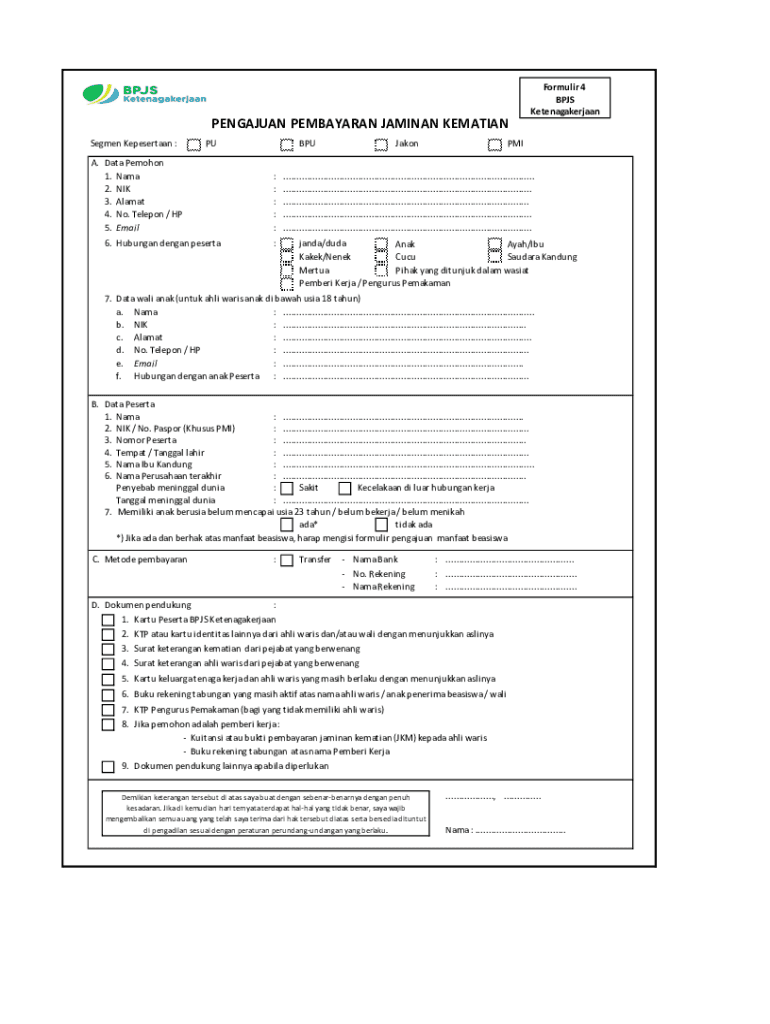
PENGUIN PEMBAYARAN JAMAICAN KERATIN Segment Kepesertaan :PUA. Data Peloton 1. Name 2. NICK 3. Ala mat 4. No. Telephone / HP 5. Email 6. Suburban began pesertaBPU : : : : : :JakonFormulir 4 BPS KetenagakerjaanPMI.............................................................................................. ............................................................................................. .
Loading

Open form follow the instructions

Easily sign the form with your finger

Send filled & signed form or save
How to fill out the ID BPJS Ketenagakerjaan Formulir 4 online
This guide provides comprehensive, step-by-step instructions for completing the ID BPJS Ketenagakerjaan Formulir 4 online. Intended to assist users with varying levels of experience, this resource ensures clarity and ease of use in the process.
Follow the steps to complete the form accurately and efficiently.
- Click ‘Get Form’ button to obtain the form and open it in the editor.
- Input your personal data in the 'A. Data Pemohon' section. Provide your full name, NIK (National Identity Number), address, phone number, and email. Specify your relationship to the participant.
- If applicable, enter data for the 'B. Data Wali Anak' section for children under 18 years of age. Fill in their name, NIK, address, phone number, email, and your relationship to the child.
- In the 'B. Data Peserta' section, enter details about the participant. This includes their name, NIK or passport number (if they are an international worker), participant number, place and date of birth, mother's name, and last company name.
- Fill in the cause of death and the date of death in the designated fields.
- Indicate whether the participant has children who are under 23 years old, unmarried, or not working by selecting 'ada' or 'tidak ada'.
- For the 'C. Metode Pembayaran' section, choose your preferred payment method, whether it is via bank transfer or cashless. Provide the name of the bank and account number as necessary.
- Prepare the supporting documents as outlined in the 'D. Dokumen Pendukung' section. Ensure to have a valid BPJS card, identification for heirs or guardians, death certificate, certificate of heirs, family card, active bank book, and any additional documents required.
- Review all provided information for accuracy. Once confirmed, save your changes, then download, print, or share the completed form.
Start filling out your ID BPJS Ketenagakerjaan Formulir 4 online today!
Experience a faster way to fill out and sign forms on the web. Access the most extensive library of templates available.
Related content
24, 25, Tester's Signature & Date, Print the form, and have the tester sign and date this...
Formulir BPJS Ketenagakerjaan 5 PENGAJUAN PEMBAYARAN JAMINAN HARI TUA A. Yang bertanda...
Click on the link in the BIO and fill out the contact form. ... The JHT Scholarship...
Use professional pre-built templates to fill in and sign documents online faster. Get access to thousands of forms.
If you believe that this page should be taken down, please follow our DMCA take down process here.