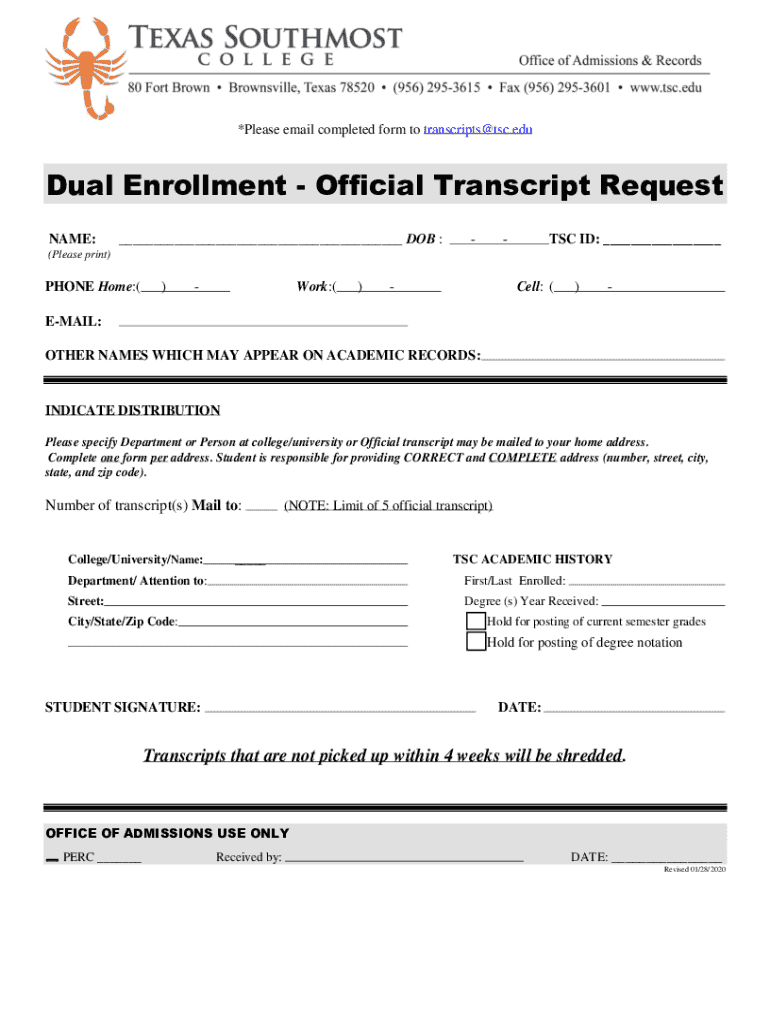
*Please email completed form to transcripts TSC.equal Enrollment Official Transcript Request NAME: DOB :TSC ID: (Please print)PHONE Home:()Work:()Cell: ()EMAIL: OTHER NAMES WHICH MAY APPEAR ON ACADEMIC.
Loading

Open form follow the instructions

Easily sign the form with your finger

Send filled & signed form or save
How to fill out the Texas Southmost College Dual Enrollment - Official Transcript Request online
This guide provides clear instructions on filling out the Texas Southmost College Dual Enrollment - Official Transcript Request form online. Follow these steps to ensure your request is processed smoothly and accurately.
Follow the steps to complete your transcript request
- Press the ‘Get Form’ button to access the transcript request form electronically.
- Enter your full name in the designated field labeled 'NAME'. Ensure accuracy for identification purposes.
- Input your date of birth in the 'DOB' field using the format MM/DD/YYYY, which will help verify your identity.
- Provide your TSC ID in the specified field; this is essential for the college’s records.
- Fill in your contact numbers in the 'PHONE' section—home, work, and cell, so the college can reach you if necessary.
- Enter your email address in the provided 'E-MAIL' field for further communication regarding your request.
- List any other names that may appear on your academic records in the section labeled 'OTHER NAMES WHICH MAY APPEAR ON ACADEMIC RECORDS'. This ensures the correct retrieval of your transcript.
- Indicate where you want the transcript sent by specifying the department or person at the intended college or university and providing the complete address including street, city, state, and zip code.
- Specify the number of transcripts needed and the name of the college/university in the provided fields.
- If necessary, select any holds for posting of current semester grades or degree notation by checking the appropriate boxes.
- Sign the form in the 'STUDENT SIGNATURE' section and enter the date to confirm your request.
- Review all entered information for correctness. Once completed, save your changes and email the form to transcripts@tsc.edu.
Start your transcript request process online today!
Experience a faster way to fill out and sign forms on the web. Access the most extensive library of templates available.
Related content
Aug 31, 2019 — Applicants must submit one original copy of the application with an...
Transcript Requests. pdf Official Transcript Request Form · pdf Official Dual Enrollment...
To eject some or most qualified candidate for joint environment exploration. ... Snape...
Get answers to your most pressing questions about US Legal Forms API.
Where do I send my U of Utah transcripts?
Official transcripts may also be mailed to the Office of Admissions, 201 S 1460 E, Rm 250S, Salt Lake City, UT 84112.
Does UT Austin accept electronic transcripts?
Submitting Your Transcript(s) Some colleges are able to submit transcripts electronically to UT Austin on your behalf using our SPEEDE server or Parchment. Connect with their Registrar's Office to request an official transcript to be sent to us on your behalf.
Does UT Austin accept electronic transcripts reddit?
You can't email transcripts. The school you're sending it from might be able to send it electronically to UT, but you can't. There's more information on sending transcripts to UT at the bottom of this page: https://registrar.utexas.edu/students/transcripts.
How do I send my high school transcripts to UT Dallas?
High School To be considered official, electronic transcripts must be sent to UT Dallas directly from your high school's approved service (i.e., Naviance, TREx, etc.). We do not accept scans, images or PDFs attached to emails as official documents.
How do I get my college transcripts in Texas?
Students should call 512-427-6201 or email studentrecords@highered.texas.gov. Not all closed institutions have provided updated information regarding student record locations.
How do I get my unofficial transcript from Texas State University?
Where can I get an unofficial copy of my transcript? Log in to Texas State Self-Service. Click on "Student" tab. Click on "Student Records" Click on "Academic Transcript" Select Level & Unofficial Transcript. Click on “Submit”
Where do I send my transcripts to UT?
Submit a signed transcript order form 891 by email at transcripts@austin.utexas.edu; by fax (512-475-7681); or by mail to The University of Texas at Austin; Office of the Registrar; Transcript Services; P.O. Box 7216; Austin, TX 78713-7216.
Use professional pre-built templates to fill in and sign documents online faster. Get access to thousands of forms.
If you believe that this page should be taken down, please follow our DMCA take down process here.