Loading
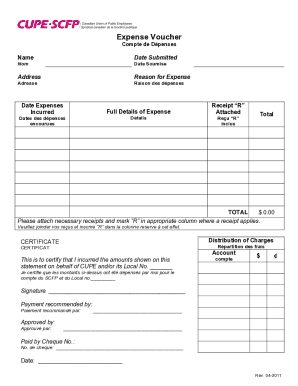
Get Canada Cupe Scfp Expense Voucher 2011
How it works
-

Open form follow the instructions
-

Easily sign the form with your finger
-

Send filled & signed form or save
How to fill out the Canada CUPE SCFP Expense Voucher online
Completing the Canada CUPE SCFP Expense Voucher online is essential for ensuring accurate reimbursement for expenses incurred on behalf of CUPE. This guide will walk you through each section of the voucher, providing detailed instructions to help you submit your expenses with confidence.
Follow the steps to complete your expense voucher online.
- Click ‘Get Form’ button to obtain the expense voucher and open it for editing.
- Enter your name in the ‘Name’ field to identify yourself as the person submitting the voucher.
- Fill in the ‘Date Submitted’ field with the date on which you are submitting the voucher.
- Provide your ‘Address’ in the designated section to ensure correct correspondence.
- In the ‘Reason for Expense’ field, succinctly describe the purpose of the incurred expenses.
- Record the ‘Date Expenses Incurred’ to clarify when the expenses were incurred.
- In the ‘Full Details of Expense’ section, include a detailed explanation of each expense, ensuring transparency.
- If applicable, check the box for ‘Receipt “R” Attached’ to indicate that you have attached corresponding receipts.
- Calculate the total expenses and input the amount in the ‘Total’ field ensuring accuracy.
- Under ‘Distribution of Charges’, detail how the charges are allocated to specific accounts.
- Complete the ‘Account’ section, certifying that you incurred the expenses on behalf of CUPE and/or its Local, filling in the local number.
- Sign in the ‘Signature’ space to verify your agreement with the submitted information.
- Have the payment recommended by a supervisor or relevant authority by providing their signature in the appropriate section.
- Ensure final approval by obtaining a signature in the ‘Approved by’ field.
- If payment is made via cheque, enter the cheque number in the ‘Paid by Cheque No.’ section.
- Finally, input the current date in the ‘Date’ field to complete the submission process.
- Once all the fields are completed, you can save your changes, download, print, or share the form as needed.
Take the next step and complete your Canada CUPE SCFP Expense Voucher online today.
Get form
Experience a faster way to fill out and sign forms on the web. Access the most extensive library of templates available.
What is an expense claim form? An expense claim form is the same as an expense reimbursement form - it is simply a form that documents business expenses that an employee must be reimbursed for.
Get This Form Now!
Use professional pre-built templates to fill in and sign documents online faster. Get access to thousands of forms.