Loading
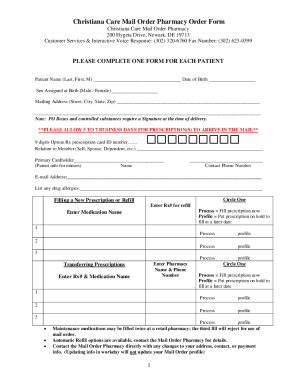
Get Christiana Care Mail Order Pharmacy Order Form 2022-2026
How it works
-

Open form follow the instructions
-

Easily sign the form with your finger
-

Send filled & signed form or save
How to fill out the Christiana Care Mail Order Pharmacy Order Form online
Completing the Christiana Care Mail Order Pharmacy Order Form online can simplify the process of obtaining your medications. This guide offers step-by-step instructions to ensure that you accurately fill out each section of the form to meet your needs.
Follow the steps to successfully complete the order form.
- Click ‘Get Form’ button to obtain the form and open it in the editor.
- In the first section, enter the patient's name (last, first, middle initial) and date of birth. Ensure accuracy to avoid any processing delays.
- Indicate the sex assigned at birth by selecting either 'Male' or 'Female'.
- Provide the complete mailing address, including street, city, state, and zip code. Note that PO Boxes and controlled substances require a signature at delivery.
- Enter the 9-digit Optum Rx prescription card ID number. Indicate the relation to the member, and fill in the primary cardholder’s name if applicable.
- Provide a contact phone number and email address for communication regarding the prescription.
- List any drug allergies to ensure safe medication provision.
- Choose whether you are filing a new prescription or a refill by circling the appropriate option. If refilling, provide the prescription number.
- For each medication, enter the name and specify if you prefer the prescription filled immediately or put on hold.
- If transferring prescriptions, provide the current prescription number and medication name, and select the desired processing option.
- In the payment information section, fill out the cardholder's name as it appears on the card, their signature, and select the type of card being used.
- Enter the credit card number, expiration date, security code, and billing zip code.
- Once all sections are filled out correctly, save changes to the form, download it, or print for your records. Make sure to keep a copy for your personal files.
Start completing your documents online today for a smoother pharmacy experience.
These internet-based pharmacies often sell unapproved, counterfeit or otherwise unsafe medicines outside the safeguards followed by licensed pharmacies. Many unsafe online pharmacies use “storefronts” to mimic licensed pharmacies or to make you think their medicines come from countries with high safety standards.