Loading
Get Au Form 1 Property Condition Report 2023-2026
How it works
-

Open form follow the instructions
-

Easily sign the form with your finger
-

Send filled & signed form or save
How to fill out the AU Form 1 Property Condition Report online
The AU Form 1 Property Condition Report is an essential document that records the condition of a residential property before a tenancy begins. This guide provides a clear, step-by-step process for filling out the form online.
Follow the steps to complete the AU Form 1 Property Condition Report.
- Use the 'Get Form' button to access the AU Form 1 Property Condition Report and open it in your preferred online editor.
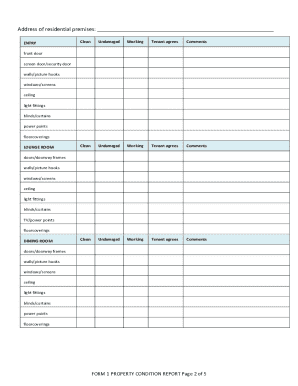
- Begin by filling in the address of the residential premises at the top of the form. This ensures that the report is clearly linked to the correct property.
- Review each section pertaining to different rooms in the property. Indicate the condition of specific items such as doors, windows, and appliances by placing a 'Y' for yes or 'N' for no in the corresponding columns.
- Provide comments where necessary to elaborate on the condition of particular items. These details can be crucial for resolving potential disputes later on.
- Once completed, the lessor or property manager must sign and date the report. It is important to do this to validate the document.
- Make sure to copy the filled-out form, as two signed copies must be provided to the tenant within seven days of their moving in. Ensure that each copy is identical.
- Ask the tenant to review the report. They should indicate their agreement or disagreement with the noted conditions using 'Y' or 'N' and add any necessary comments.
- The tenant must return one signed copy of the report to the lessor or property manager within seven days of receiving it and retain the second copy for their records.
- If you require additional space for notes or comments, attach a separate sheet. All attachments should be signed and dated by both the lessor and tenant.
- Before finalizing the process, save any changes made to the form. You may also choose to download, print, or share the completed document as necessary.
Complete your AU Form 1 Property Condition Report online today for a clear record of your property's condition.
Related links form
Call our Advice Line if you need more information on 1300 304 054.