MPORARY FOOD FACILITY VENDOR PERMIT APPLICATION PACKET A Temporary Food Facility (TFF) permit is required for anyone that sells or provides food or beverages at a temporary event. If a vendor operates more than one booth at an event, a permit must be obtained for each booth location, and separate applications must be submitted. If a vendor is operating at more than one event in San Diego County on the same day, at the same time, each location must also be permitted separately. This requirement a.
Loading

Open form follow the instructions

Easily sign the form with your finger

Send filled & signed form or save
How to fill out the CA DEH FH-632 online
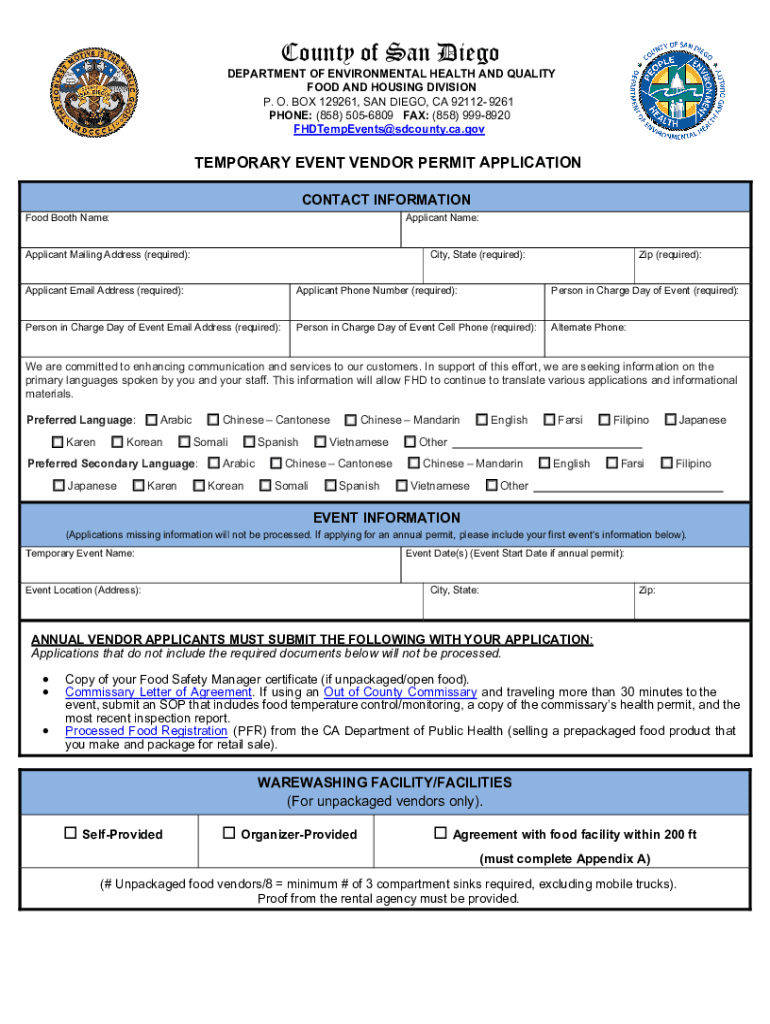
This guide offers clear instructions on how to complete the CA DEH FH-632 Temporary Food Facility Vendor Permit Application online. It aims to assist users through each section of the form, ensuring a smooth and efficient application process.
Follow the steps to successfully complete your application
- Press the ‘Get Form’ button to retrieve the application form and access it for editing.
- Begin by entering your contact information, including the food booth name, your name, mailing address, email, and phone number. Ensure all fields marked as required are completed.
- Provide the details of the person in charge during the event. Fill in their email address and cell phone number in the designated fields.
- Indicate your preferred languages for communication, selecting both a primary and a secondary language from the available options.
- In the event information section, fill out the temporary event name, the date(s) of the event, and the complete address where the event will take place.
- If applying for an annual permit, ensure to include all required documentation, such as the Food Safety Manager certificate and the Commissary Agreement Letter if applicable.
- For unpackaged food vendors, specify your warewashing facilities by selecting either self-provided or organizer-provided options.
- List all food and beverage items intended to be served at the event, detailing how each item will be served and whether it is made to order or not.
- Acknowledge your understanding of the roles and responsibilities regarding food preparation by initialing the relevant statements provided in the application.
- Calculate the total amount due based on the fee structure for single or annual permits and indicate your preferred method of payment.
- Review all sections for completeness before finalizing the application. Double-check for any missing information that could delay processing.
- Sign and date the application to certify the accuracy of the information provided, then proceed to save your changes, download, or print the completed form for submission.
Complete your application online today to ensure a successful permit process for your temporary food facility.
Experience a faster way to fill out and sign forms on the web. Access the most extensive library of templates available.
Related content
DEH:FH-632 (Rev. 07/09/2021). County of San Diego ... are responsible for vendor...
Hunting and fishing rights are significant to Canada's First. Nations. ... by public...
FOR CALIFORNIA CONSUMERS. Cancer and Reproductive Harm - www.P65Warnings.ca.gov...
Get answers to your most pressing questions about US Legal Forms API.
Where do I get a street vendor permit in San Diego?
Apply for a City of San Diego Business Tax Certificate and Sidewalk Vending Permit with the Office of the City Treasurer. Sidewalk Vending applications must be processed in-person and by appointment. To schedule an appointment, please email TRSPDPermits@sandiego.gov or call 619-615-1500.
How much is a food permit in California?
There is no charge for a seller's permit, but security deposits are sometimes required. You can apply online using online registration or you may apply at a nearby CDTFA location.
What permits do I need to sell food in California?
You must obtain a seller's permit if you: Are engaged in business in California and. Intend to sell or lease tangible personal property that would ordinarily be subject to sales tax if sold at retail.
How do I get a temporary food facility permit in California?
NEW PERMIT APPLICANTS Submit a complete application for a Temporary Event Vendor Permit and pay all applicable fees at least 30 days before your event. Late fees will apply if the application is submitted less than 14 days prior to the event start date or when fees are not paid in full within 5 days.
Do you need a permit to sell food on the street in California?
A Class B permit is necessary for individuals who want to sell their food products indirectly to customers in California.
Do you need a permit to give away free food in California?
Complimentary Incidental Food–A permit is not required for non-potentially hazardous food and beverage given away as a courtesy to waiting customers where the primary business does not involve food service.
Use professional pre-built templates to fill in and sign documents online faster. Get access to thousands of forms.
If you believe that this page should be taken down, please follow our DMCA take down process here.