Loading
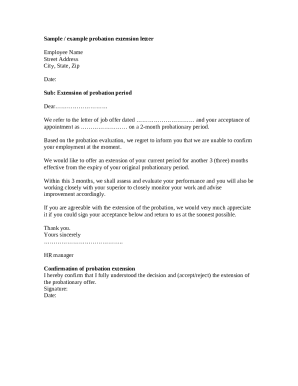
Get Probation Extension Letter
How it works
-

Open form follow the instructions
-

Easily sign the form with your finger
-

Send filled & signed form or save
How to fill out the Probation Extension Letter online
Filling out a probation extension letter can seem daunting, but with clear guidance, the process becomes manageable. This guide will help you understand each section of the letter and how to fill it out effectively online.
Follow the steps to complete the probation extension letter online.
- Click ‘Get Form’ button to obtain the form and open it in the editor.
- Begin by entering the employee's name at the top of the document. This should be the individual whose probation period is being extended.
- Next, fill in the street address, city, state, and zip code of the employee. Make sure the information is current and accurate.
- Enter the date on which you are completing the letter. This date should reflect when the letter is being sent.
- In the subject line, write 'Extension of probation period' to clearly identify the purpose of the letter.
- Address the letter to the employee by including a relevant salutation, such as 'Dear [Employee's Name]'.
- In the main body of the letter, reference the initial job offer letter and mention the original probationary period.
- State the decision regarding the employment confirmation and specify the extension period. Clearly mention the new probationary duration (e.g., three months) and the effective date.
- Detail that the employee will receive performance evaluations during the extension and will work closely with their supervisor for improvement.
- Conclude with a request for the employee's written acceptance of the extension, including a designated space for their signature and date.
- Finally, save your changes once all fields are completed, and download, print, or share the form as necessary.
Complete your probation extension letter online to ensure clarity and professionalism.
State whether the job has met your expectations We also recommend using your end of probation review to discuss whether or not the job has met your expectations. You can tell your manager about how similar or different the job is to how you imagined it would be.