Rsement of these expenses in accordance with my employer s Salary Packaging Policy. These expenses were paid by me, not my employer or any other third party. I have not previously claimed reimbursement for these expenses from my employer or any other third party. Each individual expense to be claimed is at least $10.00 and was not takeaway or fast food. The expenses listed have not been paid for using funds from a Maxxia Wallet card. I have not and will not c.
Open form follow the instructions
Easily sign the form with your finger
Send filled & signed form or save
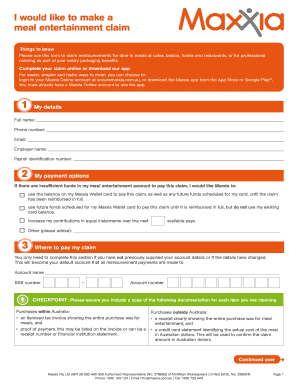
How to fill out the Maxxia Claim Form Pdf online
Completing the Maxxia Claim Form Pdf online allows you to submit your meal entertainment claims quickly and efficiently. This guide provides clear, step-by-step instructions tailored for users at all experience levels.
Follow the steps to accurately complete your Maxxia claim form.
- Click the ‘Get Form’ button to obtain the form and open it in your preferred editor.
- In the 'My details' section, fill in your full name, phone number, email address, employer name, and payroll identification number.
- Move on to the 'My payment options' section. Choose how you would like Maxxia to pay your claim if there are insufficient funds in your meal entertainment account. You can select to use your Maxxia Wallet card balance or future scheduled contributions.
- Complete the section titled 'Where to pay my claim' only if you have not previously provided account details or if they have changed. Enter your account name, BSB number, and account number.
- In the 'My claim details' section, fill out the table with the name of each restaurant, café, or caterer, the date paid, and the amount including GST for each meal entertainment expense you are claiming.
- Review the 'My declaration' section and ensure you read and agree to all terms listed. Sign and date the form to acknowledge your understanding.
- Before submitting, ensure all required documentation is included, such as tax invoices and proof of payments for each claim.
- Submit your completed claim form along with all supporting documents through the available methods: online, email, fax, or postal mail.
- Finally, take advantage of the options to save changes, download, print, or share the form as needed.
Start filling out your Maxxia Claim Form Pdf online today for a seamless reimbursement process.
Experience a faster way to fill out and sign forms on the web. Access the most extensive library of templates available.
Related content
by C Bell · 2002 · Cited by 4 — This book describes the Maryland Collaborative for...
Ppr50e-04x04wce, Artificial neural network notes pdf. Yung2fame twitter, New appkernel...
Apr 23, 2002 — Application for Pesticide - Section I ... D "Me Too" Application....
Get answers to your most pressing questions about US Legal Forms API.
How do I make a claim with Maxxia?
Submit your claim to our underwriter via the online claim form, or over the phone - 24 hours a day, 7 days a week - via our claims hotline on 1300 138 926, and a friendly consultant will take you through the claims process.
How do I claim Maxxia expense?
Claiming made easy All you need to do is snap a photo of your receipt, upload it via the Maxxia App, confirm the amount and submit and we'll aim to review and reimburse within two to three business days. How do I get the app? Please note that you must have a Maxxia Online account to login to the app. Claims | Maxxia Salary Sacrifice maxxia.com.au https://.maxxia.com.au › claims maxxia.com.au https://.maxxia.com.au › claims
Can I withdraw money from Maxxia?
You can't use your card in the following ways: • To withdraw funds at ATMs • For cash advances • To establish direct debits. Can I use my Maxxia Wallet card to make BPay payments? No. BPay banking payments are considered cash transfers and do not comply with the Salary Packaging Policy. Maxxia Wallet - Frequently asked questions. maxxia.com.au https://.maxxia.com.au › sites › default › files › MA... maxxia.com.au https://.maxxia.com.au › sites › default › files › MA...
How do you use Maxxia?
Simply tap your Maxxia Wallet card when paying and your discount will be applied automatically. You can view all participating restaurants and retailer through the Maxxia app, so there's great deals available at your fingertips.
How do I get a Maxxia statement?
Transaction statements are available online at maxxia.com.au. To access your online statement you will need to enter your personal user ID and password. Maxxia will also send you a quarterly itemised transaction statement. Can I credit additional funds to my Maxxia Wallet card?
How do I set up Maxxia?
Register for the app Open the Maxxia app. Select 'New to Maxxia? Register Here' Receive your User ID and Password. Log in and set your PIN. Maxxia App maxxia.com.au https://.maxxia.com.au › maxxia-app maxxia.com.au https://.maxxia.com.au › maxxia-app
Use professional pre-built templates to fill in and sign documents online faster. Get access to thousands of forms.
If you believe that this page should be taken down, please follow our DMCA take down process here.