Loading
Form preview
  • US Legal Forms
  • Form Library
  • More Forms
  • More Multi-State Forms
  • Purchase Order Form - Ct.gov - Ct

Get Purchase Order Form - Ct.gov - Ct

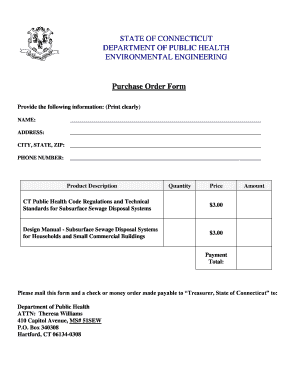
STATE OF CONNECTICUT DEPARTMENT OF PUBLIC HEALTH ENVIRONMENTAL ENGINEERING Purchase Order Form Provide the following information: (Print clearly) NAME: ADDRESS: CITY, STATE, ZIP: PHONE NUMBER: Product.

How it works

  1. Open form

    Open form follow the instructions

  2. Easily sign form

    Easily sign the form with your finger

  3. Share form

    Send filled & signed form or save

How to fill out the Purchase Order Form - CT.gov - Ct online

Filling out the Purchase Order Form is an essential process for ordering specific documents from the Connecticut Department of Public Health. This guide provides clear, step-by-step instructions to help users complete the form accurately and efficiently.

Follow the steps to complete the Purchase Order Form successfully

  1. Click 'Get Form' button to access the Purchase Order Form and open it in your preferred editor.
  2. Begin by filling in your name clearly in the designated field. Ensure that your name is printed properly to prevent any processing issues.
  3. Next, enter your address, including street details, to ensure accurate delivery of the requested documents.
  4. In the 'City, State, Zip' section, provide your city name, state abbreviation, and zip code to complete your location information.
  5. Fill in your phone number to allow for any necessary follow-up communication regarding your order.
  6. In the 'Product Description' section, indicate the documents you wish to purchase. Note the quantity and price for each document ordered, ensuring you double-check the total amounts.
  7. Calculate the total payment amount based on the quantities and prices listed, and write this amount in the 'Payment Total' section for clarity.
  8. Once you have confirmed all information is accurate, print the completed form. Keep a copy for your records.
  9. Mail the printed form along with a check or money order made payable to 'Treasurer, State of Connecticut' to the specified address provided on the form for processing.
  10. Ensure you send the payment and form to the Department of Public Health, ATTN: Theresa Williams, at the address provided to avoid processing delays.

Complete your Purchase Order Form online to request the necessary documents today.

Get form

Experience a faster way to fill out and sign forms on the web. Access the most extensive library of templates available.
Get form

Related content

Forms
The completed form is submitted by a non-state entity EITHER as an appendix to a bid or...
Learn more
Connecticut State University System Procurement...
A. Preparation of the Purchase Order ... C. Amendment of Purchase Orders ... information...
Learn more
Connecticut Highway Safety Federal Fiscal Year...
Dec 19, 2018 — This Annual Report contains information on initiatives, projects...
Learn more

Related links form

Lion Country Safari Online Application Form Boulder Vally School District Medication Form Cardiac Cta Worksheet Form Positioning Your Self For Success:

Questions & Answers

Get answers to your most pressing questions about US Legal Forms API.

Contact support

How to sell your vehicle without a title: Request and complete a Supplemental Assignment of Ownership Form (Form Q1). This form is also available at your local DMV office. Without this form, we are unable to transfer ownership. Complete the Application for Replacement Certificate of Title (Form H6B).

If requested via myconneCT or the TSC, and you are in good standing, a letter will be displayed for print out. If you are not in good standing, you will receive a message that you have outstanding obligations.

For a vehicle titled in the State of Connecticut, the executor or administrator of an estate must assign the Certificate of Title to the purchaser. Find a list of acceptable probate court documents and registration requirements.

A Connecticut title transfer requires a bill of sale that includes the following information: The names and addresses of both the new owner and seller. The vehicle identification number (VIN) The vehicle, year, make, model, and color. The purchase price and purchase date. The seller's signature.

If a vehicle was purchased in CT and it is newer than 20 years old, you will need a title. Vehicles with a model year more than 20 years prior to the current year are non-titled and a title is not required.

The Connecticut DMV requires you to visit the office with the following documents for registration. Application for registration. Certificate of title. In the case of a used vehicle, the current certificate of title and registration certificate. Bill of sale. Identification form. Proof of insurance. Registration fee payment.

Get This Form Now!

Use professional pre-built templates to fill in and sign documents online faster. Get access to thousands of forms.
Get form
If you believe that this page should be taken down, please follow our DMCA take down processhere.

Industry-leading security and compliance

US Legal Forms protects your data by complying with industry-specific security standards.
  • In businnes since 1997
    25+ years providing professional legal documents.
  • Accredited business
    Guarantees that a business meets BBB accreditation standards in the US and Canada.
  • Secured by Braintree
    Validated Level 1 PCI DSS compliant payment gateway that accepts most major credit and debit card brands from across the globe.
Get Purchase Order Form - CT.gov - Ct
Get form
  • Adoption
  • Bankruptcy
  • Contractors
  • Divorce
  • Home Sales
  • Employment
  • Identity Theft
  • Incorporation
  • Landlord Tenant
  • Living Trust
  • Name Change
  • Personal Planning
  • Small Business
  • Wills & Estates
  • Packages A-Z
  • Affidavits
  • Bankruptcy
  • Bill of Sale
  • Corporate - LLC
  • Divorce
  • Employment
  • Identity Theft
  • Internet Technology
  • Landlord Tenant
  • Living Wills
  • Name Change
  • Power of Attorney
  • Real Estate
  • Small Estates
  • Wills
  • All Forms
  • Forms A-Z
  • Form Library
  • Legal Hub
  • About Us
  • Help Portal
  • Legal Resources
  • Blog
  • Affiliates
  • Contact Us
  • Delete My Account
  • Site Map
  • Industries
  • Forms in Spanish
  • Localized Forms
  • State-specific Forms
  • Forms Kit
  • Real Estate Handbook
  • All Guides
  • Notarize
  • Incorporation services
  • For Consumers
  • For Small Business
  • For Attorneys
  • USLegal
  • FormsPass
  • pdfFiller
  • signNow
  • altaFlow
  • DocHub
  • Instapage
Form Packages
  • Adoption
  • Bankruptcy
  • Contractors
  • Divorce
  • Home Sales
  • Employment
  • Identity Theft
  • Incorporation
  • Landlord Tenant
  • Living Trust
  • Name Change
  • Personal Planning
  • Small Business
  • Wills & Estates
  • Packages A-Z
Form Categories
  • Affidavits
  • Bankruptcy
  • Bill of Sale
  • Corporate - LLC
  • Divorce
  • Employment
  • Identity Theft
  • Internet Technology
  • Landlord Tenant
  • Living Wills
  • Name Change
  • Power of Attorney
  • Real Estate
  • Small Estates
  • Wills
  • All Forms
  • Forms A-Z
  • Form Library
Customer Service
  • Legal Hub
  • About Us
  • Help Portal
  • Legal Resources
  • Blog
  • Affiliates
  • Contact Us
  • Delete My Account
  • Site Map
  • Industries
  • Forms in Spanish
  • Localized Forms
  • State-specific Forms
  • Forms Kit
Legal Guides
  • Real Estate Handbook
  • All Guides
Prepared for you
  • Notarize
  • Incorporation services
Our Customers
  • For Consumers
  • For Small Business
  • For Attorneys
Our Sites
  • USLegal
  • FormsPass
  • pdfFiller
  • signNow
  • altaFlow
  • DocHub
  • Instapage
Social Media
Call us now toll free:
+1 833 426 79 33
As seen in:
© Copyright 1999-2026 airSlate Legal Forms, Inc. 3720 Flowood Dr, Flowood, Mississippi 39232
  • Your Privacy Choices
  • Terms of Service
  • Privacy Notice
  • Content Takedown Policy
  • Bug Bounty Program