Loading
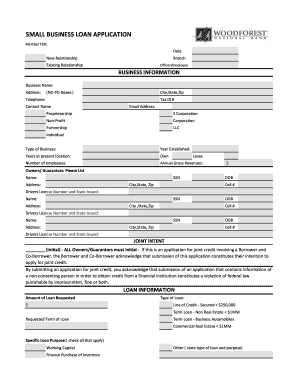
Get Woodforest Loan Form
How it works
-

Open form follow the instructions
-

Easily sign the form with your finger
-

Send filled & signed form or save
How to fill out the Woodforest Loan Form online
Filling out the Woodforest Loan Form online is a straightforward process that requires accurate and comprehensive information. This guide will walk you through each section of the form, ensuring you provide all necessary details for a successful application.
Follow the steps to complete your Woodforest Loan Form.
- Press the ‘Get Form’ button to access the form and open it in your browser.
- Begin with the 'Business Information' section. Fill in your business name, address (no P.O. boxes), city, state, zip code, telephone number, tax ID number, contact name, and email address. Ensure all details are accurate and up to date.
- Indicate the type of business from the options provided (e.g., proprietorship, corporation, LLC, etc.) and enter the year your business was established, your years at the current location, number of employees, and annual gross revenues.
- In the 'Owners/Guarantors' section, list each owner's name, social security number, address, city, state, zip code, date of birth, cell number, and driver's license number. Repeat this for all owners or guarantors.
- In the 'Joint Intent' section, ensure that all owners/guarantors initial the statement regarding joint credit application. This is a necessary step to confirm your intention to apply for joint credit.
- Proceed to the 'Loan Information' section and specify the amount of the loan requested. Select the type of loan and indicate the requested term of the loan.
- Choose the specific loan purposes from the list provided, checking all that apply to your needs. Provide details about any collateral available for the loan.
- Fill in your 'Financial Information', listing your business banking accounts, including bank name, account balances, and account numbers. Additionally, provide details of your credit obligations, including the name of the creditor, loan purpose, current loan balance, repayment terms, and maturity date.
- Review the 'Customer Identification Policy' section. Be prepared to provide identification information as required by federal law.
- Read and accept the 'Application Certification and Agreement' statement. Ensure you provide signatures for all owners/guarantors along with the date of signing.
- Once all sections are completed, save your changes, download the completed form, print a copy for your records, or share it as necessary.
Complete your Woodforest Loan Form online today to get started on your business loan application.
Secured Personal Loan The reason secured personal loans are easy to get approved for is that you will have to put up collateral that the lender can keep if you don't pay the loan back. This minimizes the lender's risk, so the approval criteria are relatively easy to meet.