Loading
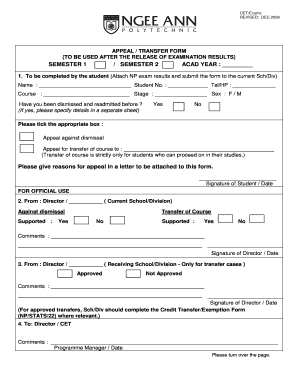
Get Ngee Ann Poly Appeal Letter
How it works
-

Open form follow the instructions
-

Easily sign the form with your finger
-

Send filled & signed form or save
How to fill out the Ngee Ann Poly Appeal Letter online
This guide provides clear instructions on completing the Ngee Ann Poly Appeal Letter online. It outlines the necessary steps to help you effectively fill out the form and submit your appeal or transfer request.
Follow the steps to complete your appeal letter online
- Click ‘Get Form’ button to obtain the form and open it in the editor.
- In Section 1, fill in your personal information, including your name, student number, telephone or mobile number, course, stage, and sex. Be sure to complete all fields accurately.
- Indicate whether you have been dismissed and readmitted before by choosing 'Yes' or 'No.' If you select 'Yes,' provide details on a separate sheet as required.
- Select the appropriate option for your appeal — either against dismissal or for course transfer. Specify the course you wish to transfer to if applicable.
- Attach a letter detailing your reasons for the appeal to this form. Make sure this is thorough and clearly articulated.
- Sign the form and date it at the bottom of Section 1 before submission.
- Submit the completed form, along with all required documents, to your current school or division for processing.
Complete your documents online today!
How to write an appeal letter for college Understand the appeals process. ... Appeal quickly. ... Represent yourself. ... Explain the situation with details. ... Reveal your reality. ... Be kind and friendly. ... Make an alternate plan just in case.