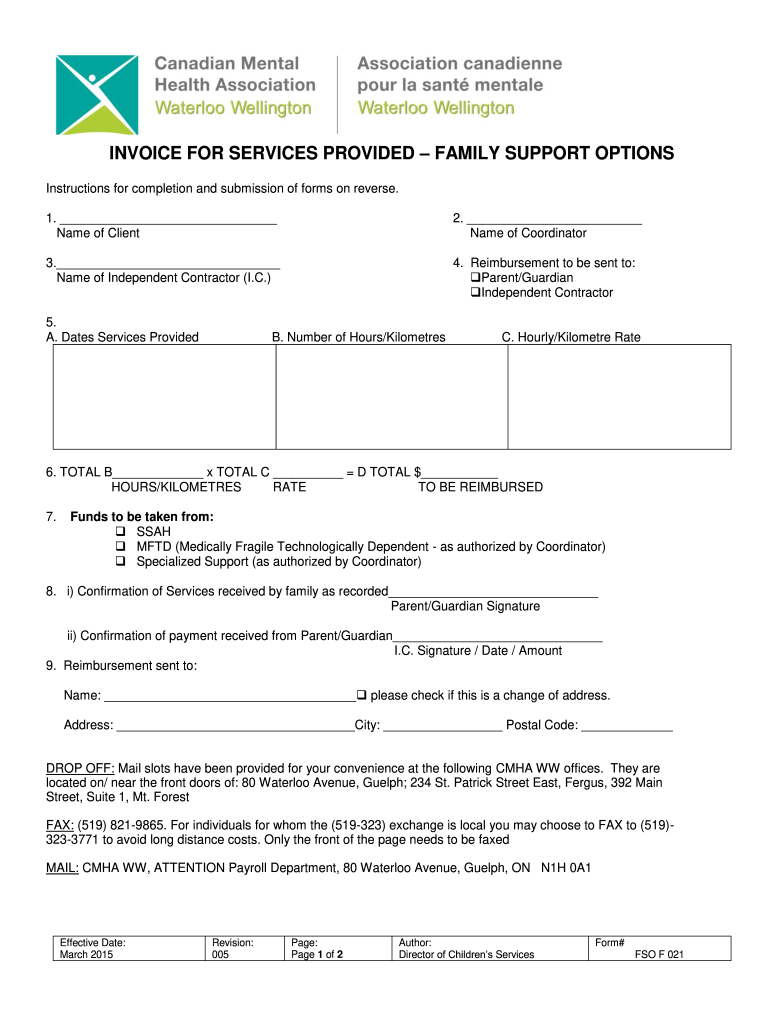
INVOICE FOR SERVICES PROVIDED FAMILY SUPPORT OPTIONS Instructions for completion and submission of forms on reverse. 1. Name of Client2. Name of Coordinator3. Name of Independent Contractor (I.C.)4.
Loading

Open form follow the instructions

Easily sign the form with your finger

Send filled & signed form or save
How to fill out the Canada CMHA FSO F 021 online
This guide provides step-by-step instructions for completing the Canada CMHA FSO F 021 form online, ensuring users have a clear understanding of each field and section. Follow these detailed instructions to facilitate a smooth process.
Follow the steps to successfully complete the form online
- Use the ‘Get Form’ button to download the Canada CMHA FSO F 021 form and open it in your preferred online editor.
- In the first section, enter the name of the client in the designated field. This is essential for identifying the individual receiving the services.
- Fill in the name of the coordinator in the respective field to ensure proper communication and processing of the invoice.
- Provide the name of the independent contractor in the specified area. This identifies the service provider offering the assistance.
- Select whether the reimbursement should be sent to the parent/guardian or the independent contractor by checking the appropriate box.
- In section A, record the dates when services were provided. In section B, enter the number of hours worked or kilometers traveled. Section C requires you to input the hourly or kilometer rate agreed upon for reimbursement.
- Calculate the total reimbursement by multiplying the values entered in section B (total hours or kilometers) by section C (rate). Input the result in the designated total field.
- Indicate which fund will be used for reimbursement by checking the appropriate box, such as SSAH, MFTD, or Specialized Support. This ensures the correct allocation of funds.
- Obtain the required signatures in section 8 to confirm that services were received by the parent/guardian and the independent contractor has acknowledged payment. Include their signatures, date, and amount if applicable.
- Complete the reimbursement section by filling in the name and full address where the payment should be sent. If this is a change of address, check the corresponding box.
- Once all sections are filled out correctly, review the document for any errors. Save your changes, and you may then choose to download, print, or share the completed form as required.
Complete your documents online efficiently and accurately today.
Experience a faster way to fill out and sign forms on the web. Access the most extensive library of templates available.
Related content
50 MWAANYESR ATOS DMEA HKAEC MERE RDLOEIADS IPMTUAEAYDBIOLESS R LEODSIT MUAEBDLIOES 2...
As of the date hereof, the Proxy Statement is in preliminary form and is subject to...
Use professional pre-built templates to fill in and sign documents online faster. Get access to thousands of forms.
If you believe that this page should be taken down, please follow our DMCA take down process here.