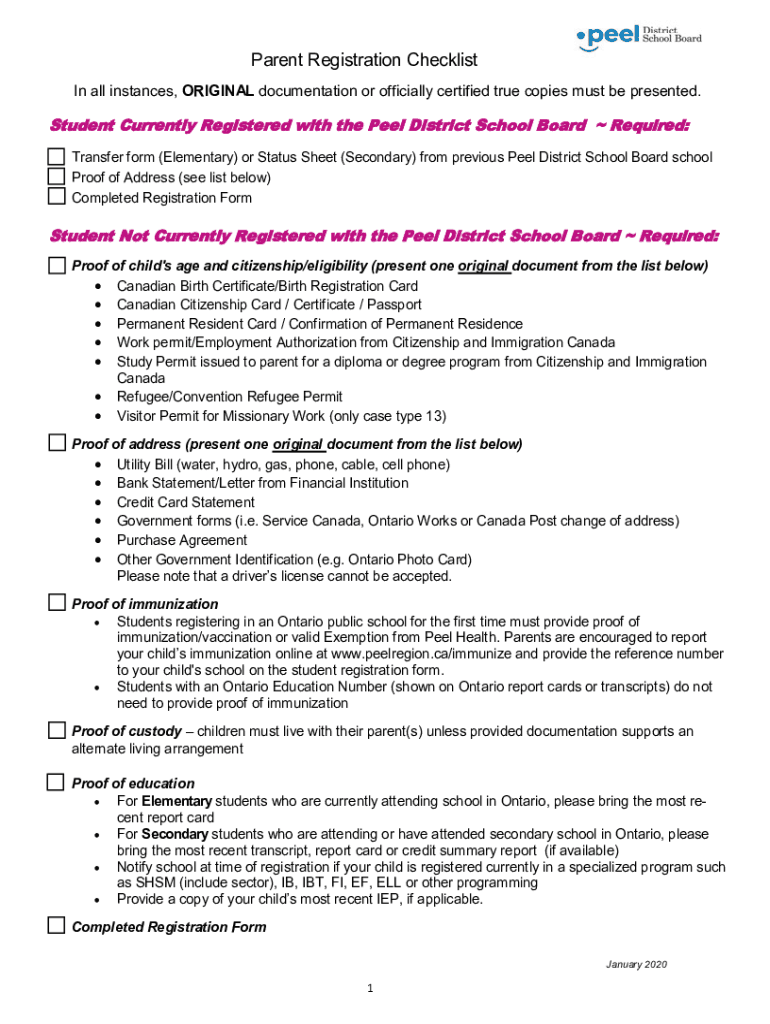
Parent Registration Checklist In all instances, ORIGINAL documentation or officially certified true copies must be presented. Student Currently Registered with the Peel District School Board Required:.
Loading

Open form follow the instructions

Easily sign the form with your finger

Send filled & signed form or save
How to fill out the Canada Peel District School Board Student Registration Form online
Filling out the Canada Peel District School Board Student Registration Form online is an essential step in enrolling your child in school. This guide provides you with detailed instructions and insights into each section of the form to ensure a smooth registration process.
Follow the steps to complete your registration successfully.
- Click ‘Get Form’ button to obtain the form and open it in the editor.
- Provide necessary documentation: If your child is currently registered with the Peel District School Board, you need to submit a Transfer form (Elementary) or Status Sheet (Secondary), proof of address, and a completed registration form. If they are not registered, you must include proof of age and citizenship/eligibility.
- Fill in student information: Complete the sections requiring the student’s legal name, preferred name, birth date, gender, and residential address. Ensure that the details match the supporting documents.
- Indicate proof of address: Present one original document listed under proof of address, such as a utility bill or bank statement, ensuring it reflects the current address.
- Provide proof of immunization: For new students, submit proof of immunization or a valid exemption reference number as per Peel Health requirements.
- Clarify custody situations: Complete the sections regarding custody, stating whether the student lives with both parents, a single parent, or a guardian. Necessary documentation must accompany this.
- Include additional educational information: Attach the most recent report card or transcript for students transferring from another school, especially for those in specialized programs.
- Review and finalize the form: Once all applicable sections are filled out, review the information for accuracy. Save changes, download, print, or share the completed form as needed.
Complete your documents online today for a seamless registration experience.
Experience a faster way to fill out and sign forms on the web. Access the most extensive library of templates available.
Related content
The Michigan State Board of Education complies with all Federal laws and ... New Student...
POLICY IN THE PEEL DISTRICT SCHOOL BOARD by. Mary S. ... claims, involves a value...
Kingston is a city in Eastern Ontario, Canada. It is on the eastern end of Lake Ontario...
Get answers to your most pressing questions about US Legal Forms API.
How do I contact Peel EVS?
If you have general questions about curriculum, call the Curriculum & Instruction Support Services department of the board at 905-890-1010 (or 1-800-668-1146) ext. 2559.
How do I find my Peel student number?
Is your child currently enrolled in a Peel school? The pupil number is the student number on the report card.
What is the Peel District School Board number?
To contact the Peel District School Board's general line or department staff, call 905-890-1010 (or 1-800-668-1146) or view our board administration and department staff directory.
How do you use safe arrival?
0:55 2:24 How to Use SafeArrival - YouTube YouTube Start of suggested clip End of suggested clip Click on the menu bar. Choose attendance choose report in absence. Choose your student. The type ofMoreClick on the menu bar. Choose attendance choose report in absence. Choose your student. The type of absence which is full day or multiple day the reason which will be absent with notification.
What is the safe arrival number for Peel District School Board?
By reporting your child's absence in advance on the SafeArrival SchoolMessenger mobile app, SafeArrival website (go.schoolmessenger.ca) or 1-844-435-3440 (toll-free number), you will not receive a notification.
What is the phone number for Peel Region School Messenger?
Use the SchoolMessenger app on your mobile device Download and the SchoolMessenger app from the Apple App Store or Google Play (or from links at go.schoolmessenger.ca). Call the toll-free number 1-855-209-6155 Follow the instructions to report an absence using the automated phone system.
Who is the director of PDSB?
Rashmi Swarup - Director of Education and CEO - Peel District School Board | LinkedIn.
How do I email peel summer school?
For more information or questions about the summer school program, you can call us at 905-890-1010 ext. 6610, email us at conted.info@peelsb.com and follow us on Twitter for updates.
How do I register my child for school in Peel Region?
For general questions about the application process, please contact 905-890-1010 ext....Register in three simple steps Birth Certificate/Birth Registration Card. Citizenship Card/Certificate/Passport/Permanent Resident Card/Confirmation of Permanent Residence. Certificate of Indian Status. Refugee/Convention Refugee Permit.
How do I contact peel board?
To contact the Peel District School Board's general line or department staff, call 905-890-1010 (or 1-800-668-1146) or view our board administration and department staff directory.
Use professional pre-built templates to fill in and sign documents online faster. Get access to thousands of forms.
If you believe that this page should be taken down, please follow our DMCA take down process here.