Loading
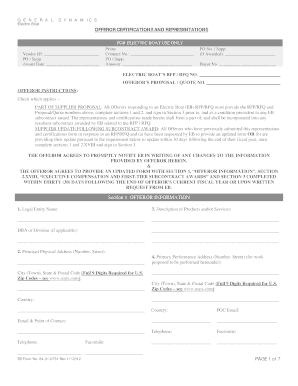
Get General Dynamics Electric Boat 84-01-0751 2012
How it works
-

Open form follow the instructions
-

Easily sign the form with your finger
-

Send filled & signed form or save
How to fill out the General Dynamics Electric Boat 84-01-0751 online
Filling out the General Dynamics Electric Boat 84-01-0751 form online can seem challenging, but this comprehensive guide breaks down each step to ensure clarity and understanding. This form is essential for submitting your offer to Electric Boat and includes crucial certifications and representations.
Follow the steps to effectively complete the form.
- Click the ‘Get Form’ button to access the online version of the General Dynamics Electric Boat 84-01-0751 form.
- Fill out the 'Vendor ID' and 'PO / Supp. Award Date' in the designated fields. Ensure you provide accurate information as it is crucial for processing.
- Complete the 'Section 1: OFFEROR INFORMATION'. This includes providing your Legal Entity Name, Description of Products and/or Services, and the DBA or Division if applicable.
- Enter your Principal Physical Address, ensuring to include the full address with the postal code. Remember, for U.S. zip codes, include all nine digits.
- Fill in the Primary Performance Address for the work proposed, if different from your principal address. This information is vital for the proposal detailed location.
- Provide the Point of Contact Email, including any additional contact details such as Telephone and Facsimile numbers. This allows Electric Boat to connect with you easily.
- Move to 'Section 2: OFFEROR REPRESENTATIONS AND CERTIFICATIONS'. Check the appropriate boxes for technical and contractual exceptions, and provide any necessary descriptions.
- Input your DUNS Number and indicate your registration status with the U.S. Government’s Central Contractor Registration (CCR) database.
- Fill out the required certifications, including the Certificate of Independent Price Determination and any required pricing basis information.
- Complete the executive compensation section if relevant. Make sure to update information as necessary, especially within the defined timelines.
- In 'Section 3: AUTHORIZED SIGNATURE OF OFFEROR', certify accuracy by providing your signature, printed name, title, company name, and date.
- Review all entries for accuracy before submitting. Ensure you save changes, and consider downloading or printing a copy for your records.
Complete your documentation process online to ensure a smooth submission.
Get form
Experience a faster way to fill out and sign forms on the web. Access the most extensive library of templates available.
Established in 1899, Electric Boat has established standards of excellence in the design, construction and lifecycle support of submarines for the U.S. Navy.
Get This Form Now!
Use professional pre-built templates to fill in and sign documents online faster. Get access to thousands of forms.